
Gift Card Management Software: 15 Features to Compare
Compare 15 gift card management software features: balance tracking, partial redemption, POS integration, fraud controls, reporting and mobile wallets.

Gift card management software helps businesses issue, activate, track and redeem gift cards while maintaining accurate balances and transaction histories. The practical challenge is making those records agree with what customers can spend at checkout, especially after partial payments, refunds or failed transactions.
Providers handle different parts of this process. Some operate inside a POS or ecommerce platform; others manage stored value or deliver customer-facing cards. A suitable system must support your actual sales and redemption channels. This guide compares 15 capabilities, separates core requirements from optional extras and explains what to ask vendors to demonstrate before you buy.
What is gift card management software?
Gift card management software operates some or all of a business’s gift card program: creating identifiers, activating value, recording spending, handling adjustments and reporting outstanding balances.
Four responsibilities matter when comparing products:
- Program management: Administers issuance, card status, policies and staff activity.
- Stored-value ledger: Holds the authoritative monetary balance and transaction history for each card.
- POS or ecommerce checkout: Accepts the card, requests authorization and records the purchase and redemption.
- Digital wallet platform: Presents card information in a customer’s mobile wallet using data from connected systems.
One product may combine several roles. A wallet pass alone does not replace a ledger or checkout. Similarly, selling e-gift cards online does not establish that they will work at an in-store terminal.
When these responsibilities are connected correctly, staff can resolve balance questions, customers receive consistent information and finance teams can reconcile activity. Those outcomes depend on configuration, reliable transactions and operating procedures.

Image source: Canva
How gift card management systems work
Consider this example of a $50 gift card purchase:
- The selling system collects the buyer’s payment.
- The gift card system creates an identifier and activates $50 of usable value once the required payment conditions are met.
- The recipient receives the card through the supported delivery channel.
- At an eligible $20 purchase, checkout validates the card and requests redemption.
- The stored-value system records the $20 debit, leaving an authoritative balance of $30.
- If a wallet pass is connected, the integration sends the remaining $30 to the pass for display.
Several products may perform these steps. A barcode or QR code identifies the card; scanning it does not independently authorize payment or subtract value.
Exceptions need defined outcomes. A cancelled sale should not leave unintended usable value. An insufficient balance should trigger the supported split-payment or decline process. A confirmed failed redemption should not reduce available funds; if the outcome is uncertain, staff should check the transaction record before retrying. Refunds need a documented route back to the correct payment method. A delayed wallet update should not override the ledger’s balance.
15 features to look for in gift card management software
Use the table to shortlist requirements, then request evidence for the features that apply to your program. Here, core means a responsibility your overall solution must cover; it need not come from a single provider.
| Feature | Priority | What to verify |
|---|---|---|
| Issuance and activation | Core | When value becomes spendable |
| Balance management | Core | Authoritative balance and transaction history |
| Partial redemption | Core for reusable-value cards | Remaining value and split-payment behavior |
| POS and ecommerce acceptance | Channel-dependent | Supported terminals, checkout and locations |
| Refunds and reversals | Core | Correct destination and linked records |
| Fraud controls | Core | Code security and duplicate-use protection |
| Staff permissions | Core | Restricted, traceable value adjustments |
| Financial reporting | Core | Outstanding value and reconciliation |
| Integrations | System-dependent | Supported events and failure recovery |
| Expiry and policy controls | Jurisdiction-dependent | Legally appropriate terms and enforcement |
| Delivery and replacement | Channel-dependent | Recipient access and lost-card procedures |
| Reloading | Optional | Additional loads and payment confirmation |
| Bulk issuance | Optional | Unique identifiers and batch reconciliation |
| Customization | Customer-experience feature | Clear information in supported formats |
| Mobile wallets | Optional | Issuance, acceptance and balance updates |

Image source: Freepik
1. Gift card creation, issuance and activation
Creation assigns a unique identifier; activation makes value available to spend. Check supported denominations, currencies and whether unpaid cards remain inactive.
Ask the vendor to demonstrate successful payment, declined payment and cancellation. Each should leave the correct card status and a traceable order reference. Promotional cards issued without payment should follow a separate authorization process, so staff cannot accidentally create spendable value without approval.
2. Accurate balance management and transaction history
The ledger must account for the initial load, redemptions, refunds, reloads and authorized adjustments. A current balance without supporting history makes disputes harder to investigate.
Request a card-level view with amounts, timestamps, transaction references and status. Establish which record wins if a receipt, customer display and backend disagree. When two checkouts attempt to spend the same balance, verify that the system prevents spending more value than is available.
3. Partial redemption and split payments
Partial redemption lets customers spend part of a card and retain the rest. In the example above, spending $20 leaves $30 available for another purchase.
Split payment handles the opposite situation: a $70 purchase paid with a $50 gift card and another tender for $20. Demonstrate both at each required checkout. Ask what happens to the gift card debit if the second payment fails; the order should not leave an unexplained deduction.
4. POS and ecommerce redemption compatibility
Verify specific POS versions, ecommerce plans, locations and checkout methods. A platform logo in an integration directory is insufficient evidence that a particular redemption flow works.
If cards must work online and in-store, both channels need access to consistent value and eligibility rules. Ask whether balances are checked during redemption, what happens during a connection outage and whether any offline acceptance creates a risk of spending the same funds twice. The online gift card software guide covers the online channel in more detail.
5. Refunds, cancellations and reversals
Distinguish refunding goods paid for with a gift card from refunding the purchase of the gift card itself. The first may restore value; the second may require deactivation and a refund to the buyer.
Test full and partial refunds, mixed-tender purchases, failed redemptions and incorrect adjustments. Provider rules vary: Shopify’s refund documentation describes how gift-card and other payment methods are treated. Require linked transaction records, so correcting an error does not silently erase its history.
6. Secure card identifiers and fraud prevention
Gift card credentials can expose spendable value. Ask how codes are generated, protected from guessing and restricted from unnecessary staff access. Check balance-lookup protections, suspicious-activity monitoring and procedures for blocking compromised cards.
Duplicate-use controls should address simultaneous redemption and repeated requests, not just identical card numbers. Request documented controls and a demonstration; do not assume a barcode, encryption claim or wallet format prevents every form of fraud.
7. Staff permissions and audit trails
Issuing promotional value, changing balances, refunding purchases and exporting data should require appropriate permissions. Staff who only redeem cards may not need those privileges.
Ask to see a manual adjustment with its operator, time, reason and related transaction. Confirm whether approvals or limits can apply to sensitive actions. An investigation should reveal who changed value and why, rather than merely showing the latest balance.
8. Sales, redemption and liability reporting
Reports should distinguish cards sold, value issued, value redeemed, remaining balances, refunds and adjustments. Complimentary issuance is different from a paid sale; pass installations are different from either.
Ask finance to reconcile a sample reporting period against payment settlements and order records, with agreed reporting cutoffs and currencies. For detailed metrics and record ownership, see gift card tracking software.
Receiving cash upfront does not make every unused balance profit. Outstanding value can remain an obligation; breakage recognition, tax treatment and unclaimed-property requirements need review under the applicable accounting and legal rules.
9. Integrations, APIs and synchronization
Map the events exchanged between checkout, the payment system, the ledger and reporting tools. Confirm which connections are native, connector-based or custom, and who monitors failures.
A timeout does not necessarily mean a transaction failed. Ask how the integration checks results and prevents a retry from applying value twice. For example, Square’s gift card activity API uses an idempotency key to identify requests for safe retries. Require an equivalent documented approach for your chosen system, plus recovery procedures for missed or delayed updates.
10. Expiry dates, policy and compliance controls
Expiry settings must implement lawful terms, not simply offer arbitrary dates. Requirements depend on jurisdiction and card type; purchased cards, promotional awards and store credit may receive different treatment.
In the US, CFPB rules for covered gift cards generally protect underlying funds for at least five years from issuance or the last load, as applicable, with additional conditions and exceptions. State protections may also apply. Have applicable terms reviewed before configuring expiry or fees. A wallet pass’s display status should not independently determine whether underlying funds remain valid.
11. Digital and physical gift card delivery
Check supported email, recipient links, printable formats and physical cards. Selling a card and delivering its details are separate processes: a completed payment does not prove the recipient received access.
Demonstrate resending information after delivery failure or loss. Verify the recipient before replacement, preserve remaining value and prevent both old and replacement credentials being used where codes change. Branding and delivery messages should explain where the card works and how customers get help.
12. Reloadable gift card support
Reloading adds value to an existing card rather than issuing a new one. It is useful for some ongoing programs, but unnecessary for programs designed around one-time gifting.
If required, test payment confirmation, minimum and maximum loads, failed loads and refunds. Every additional load should appear in the transaction history and update the same authoritative balance. Check whether reloading is supported across all intended channels or only at selected locations.
13. Bulk gift card issuance
Corporate gifting, employee incentives and promotional distribution may require batch creation. Ask about unique identifiers, activation controls, recipient matching and batch-level exports.
Test a small batch that includes an invalid recipient or failed delivery. Staff should distinguish created, activated and delivered cards without issuing replacement value twice. Reconcile paid corporate orders separately from complimentary promotions. Businesses that do not run these programs can treat bulk tools as optional.
14. Customization and customer-facing information
Prioritize legibility and useful instructions alongside branding. Customers need the card identifier, supported balance information, redemption conditions and a way to contact support.
Check what each format can display and how changes reach customers. A fixed PDF may retain an old printed balance, while a connected customer display can receive updates. Attractive artwork cannot establish acceptance at checkout. Evaluate supported fields and accessibility before spending time on detailed visual customization.
15. Apple Wallet and Google Wallet compatibility
Wallet passes can keep card information accessible on a phone. Verify supported fields, identifiers, barcode formats and the process for updating displayed balances after spending.
Acceptance still depends on the retailer’s checkout and ledger connection. Barcode scanning requires compatible readers; NFC requires an appropriate implementation and hardware. Adding a gift card to Apple Wallet or Google Wallet does not automatically enable Apple Pay or Google Pay to process that merchant’s gift card transactions.
How to choose the right gift card management system
Start with the capabilities your existing POS and ecommerce systems already provide. List locations, redemption channels, expected volume, operating currencies and staff responsibilities, then identify the missing functions.
| Software approach | Typical role | What to verify |
|---|---|---|
| POS-integrated system | Runs gift card transactions within store checkout | Activation, redemption, terminal support and cross-location balances |
| Ecommerce system | Handles online gift card sales and checkout | Payment confirmation, refund rules and any in-store connection |
| Dedicated gift card platform | Provides separate program or stored-value services | Ledger ownership, acceptance integrations, exports and reconciliation |
| Digital wallet platform | Issues and updates customer-facing passes | Connection to the ledger and actual redemption workflow |
Providers can combine these roles. Compare complete working arrangements rather than assuming one product replaces the others. For decisions centered on business size, channels and budget, use the small-business gift card software guide.
Ask shortlisted vendors to demonstrate these twelve points using your scenario:
- Payment and activation, including a cancelled purchase.
- Partial redemption and split payment.
- Consistent remaining value across required channels.
- Refunds, reversals and their transaction references.
- A staff member investigating and correcting an error.
- Fraud controls and restricted access to codes.
- Finance reconciliation of outstanding balances.
- Existing integrations and their supported events.
- Functions requiring configuration or custom development.
- Checkout outages, ambiguous results and recovery.
- Full implementation costs and ongoing responsibilities.
- Support during a failed redemption and agreed response times.
Also test staff usability and peak-volume needs. Multilingual support, currency conversion, loyalty connections and promotions belong in the requirements only when your program needs them. Before signing, confirm data export and continuity arrangements if you change providers.
How to implement and test gift card software

Image source: Freepik
Treat implementation as an acceptance test of the purchased capabilities:
- Define where cards will be sold and redeemed.
- Name the authoritative ledger and its operational owner.
- Configure identifiers, values and eligibility rules.
- Connect required payment, POS and ecommerce systems.
- Configure recipient delivery and optional wallet passes.
- Train staff on issuance, balance checks and redemption.
- Test successful purchases, activation and declined payments.
- Test partial spending, split payments and insufficient funds.
- Test refunds, duplicate attempts, connection failures and delayed updates.
- Reconcile the results before approving launch.
Record expected and actual outcomes with transaction references. Assign unresolved issues to a named owner. A successful sale alone is insufficient evidence that the full lifecycle works.
Gift card management software costs
Compare the total cost of the tested workflow, not just the advertised subscription. Request a breakdown covering:
- Monthly platform and account-access fees.
- Payment processing and gift card transaction charges.
- Per-card issuance, usage or retained-record fees.
- POS and ecommerce connectors, implementation and custom development.
- Physical production, delivery services and replacement handling.
- Support, staff training and recurring administration.
Use the same expected volume and channels for each quote. Check minimum charges, limits, overages and who pays for troubleshooting between providers. Separate fees charged by the wallet platform, payment processor and ledger provider.
PassKit pricing uses a platform fee plus pass volume. That describes the wallet service; it should not be treated as an inclusive quote for third-party payment processing, stored-value services or integration work.
Where PassKit fits into gift card management
PassKit creates, issues, distributes and updates Apple Wallet and Google Wallet passes. A pass can represent a gift card and display its identifier, supported barcode, balance information and redemption instructions. Its role is to make that information accessible to the customer.
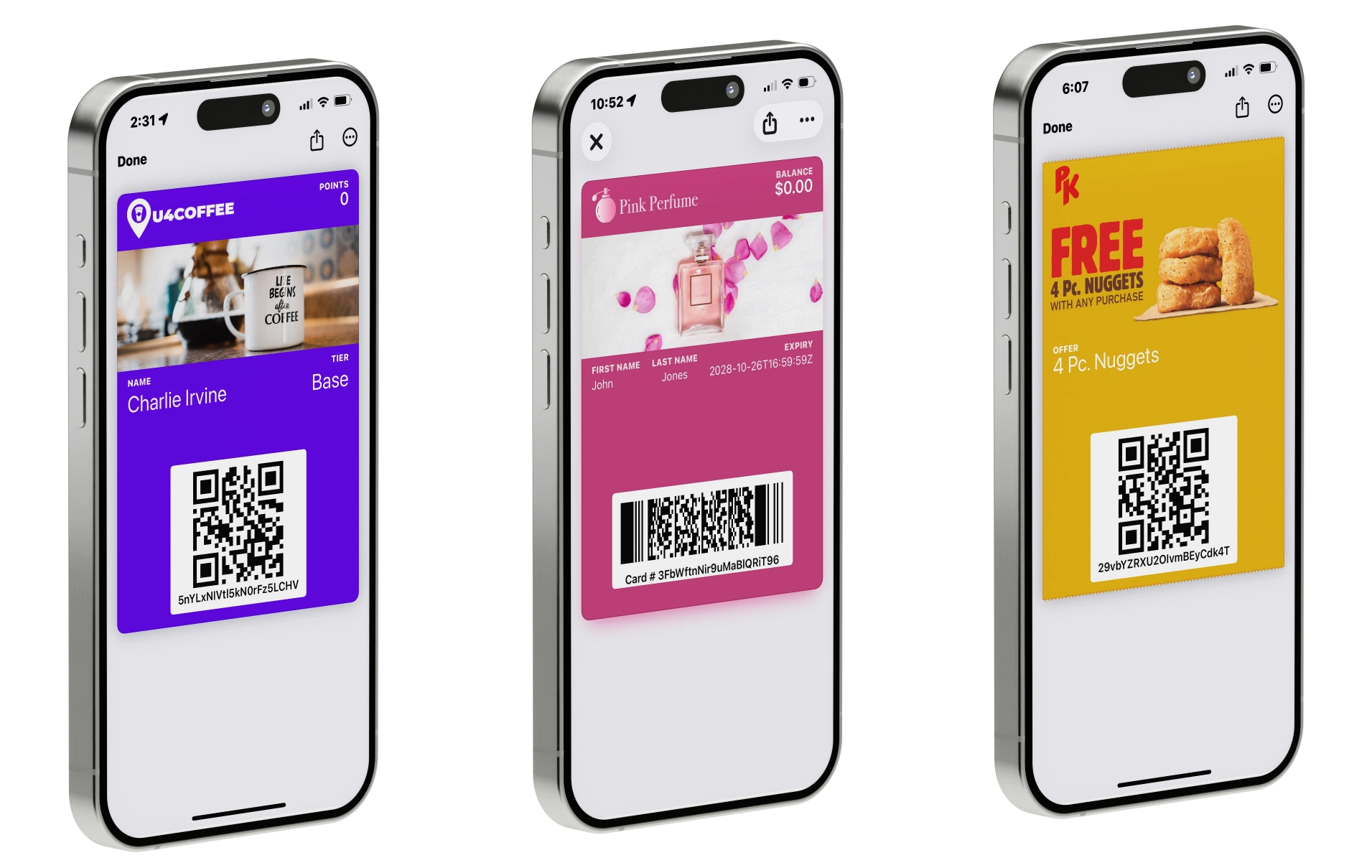
Example wallet passes with a perfume gift card in the center.
The PassKit gift card integration guide explains the separation: the gift card database holds authoritative balances and transaction records, while POS or ecommerce systems process supported redemption requests. PassKit manages the wallet representation. It does not independently hold the funds or process gift card payments.

For an integrated program, identify the existing card record, issue its corresponding pass and send confirmed balance changes to PassKit after transactions. Integration planning guidance keeps business logic in the master system. API or connector work depends on the systems involved; the presence of a connector does not establish that every gift card action is supported.
Pass links can be shared through email, SMS, websites or QR codes, as described in PassKit’s capabilities. The delivery channel, card credentials and checkout must work together. Barcode and NFC acceptance depend on supported hardware and the implemented transaction workflow.
Pass lifecycle analytics provide creation, installation, update and other lifecycle signals, with relevant operational events where recorded. These help assess wallet delivery and use; they do not replace sales, redemption or liability records from financial systems.
Explore PassKit’s gift card wallet template to see a customer-facing starting point. Evaluate its presentation alongside the ledger and checkout connections your program needs.
Common mistakes to avoid
The main buying mistake is accepting a feature label without checking the operational outcome. Avoid:
- Approving designs or scanned codes before testing actual redemption.
- Assuming a connector covers every channel, partial payment or refund.
- Retrying uncertain transactions without duplicate-processing safeguards.
- Leaving staff permissions, reversals and balance reconciliation undefined.
- Treating wallet installations as gift card sales or unused value as automatic profit.
Use the vendor demonstration and launch tests to resolve these gaps before customers encounter them.
Final thoughts
Choose gift card management software around the capabilities needed to issue value safely, maintain accurate balances, accept redemption and reconcile the results. Ask vendors to demonstrate difficult cases as well as successful purchases: split payments, refunds, outages and repeated requests often reveal important limitations.
Then add delivery formats, branding, reloading or bulk issuance where they serve your program. Give each system a clear responsibility and each unresolved failure a named owner. For businesses considering wallet-based delivery, PassKit can provide the customer-facing pass while the connected stored-value and checkout systems handle the money.
FAQs about gift card management software
What does gift card management software do?
It is business software for administering gift card issuance, activation, balances, redemption and related records. Some products combine these functions; others require connected checkout, stored-value or delivery services. It is different from a personal app for organizing cards bought from unrelated retailers.
What are the most important gift card management software features?
Prioritize accurate balances, controlled activation, secure redemption, refunds, staff permissions and financial records. Add compatibility with every required checkout channel. Partial redemption is important for reusable-value cards; bulk issuance, reloading and mobile wallets depend on the program rather than being universal requirements.
How does gift card balance management work?
An authoritative ledger records value added and deducted from each card, including refunds and approved corrections. Checkouts consult that record when processing spending. Customer-facing displays should receive confirmed changes, but a cached or delayed display should not determine how much the customer can spend.
Can customers partially redeem gift cards?
Yes, if both the gift card system and checkout support it. The amount spent is deducted and the remainder stays available. Also verify split payments for purchases above the balance, including how the system handles a failed payment for the difference.
Can gift cards be purchased online and used in-store?
Yes, when the online system and in-store checkout accept the same program and use consistent balance records. Verify the specific POS, locations, credentials and integration. Online delivery of a card does not by itself make it redeemable at a physical terminal.
Does gift card management software need POS integration?
It needs a supported connection or redemption method for in-store checkout. An online-only program may operate through ecommerce checkout instead. Ask how staff validate value and record spending; manually scanning or reading a card identifier is not enough to update the balance.
How do businesses manage gift card refunds?
They apply the provider’s supported refund process and the merchant’s lawful policy, recording changes against the original transaction. Refunding goods paid for by gift card differs from cancelling a gift card sale. Mixed-tender purchases may require allocating the refund between payment methods.
What reports should gift card software provide?
It should distinguish paid sales, issued value, redemptions, remaining balances, refunds and adjustments, with transaction references that finance can reconcile. Delivery and wallet-installation reports answer separate questions. Confirm reporting cutoffs, currencies and export access before relying on totals.
How much does gift card management software cost?
The cost depends on volume, channels and which services are included. Compare subscription, processing, issuance, integration, delivery and support charges together. Obtain a quote for your complete workflow, including third-party services and implementation work, rather than comparing headline monthly fees alone.
Can gift cards be added to Apple Wallet or Google Wallet?
Yes, when the issuer provides a compatible wallet pass and add-to-wallet process. Balance updates need a connection to the underlying gift card record. Confirm how that pass will be accepted at checkout; wallet availability does not automatically establish payment compatibility.
What is the difference between gift card management software and a digital wallet pass?
Management software operates the program and its records, often through connected systems. A digital wallet pass is a customer-facing representation of a card. It can display identifiers and balance information, but does not independently maintain the authoritative stored value or process payment.