
Loyalty Reward App: How It Works and Which Features Matter
Learn how a loyalty reward app works, from earning points to redeeming rewards. Explore essential features and what businesses need to manage customer loyalty.

A loyalty reward app helps a business identify members, record eligible activity, track points or stamps, determine when rewards become available and support redemption. The customer might interact through a dedicated app, an online account, a phone number or a pass in Apple Wallet or Google Wallet.
The customer-facing screen is only one part of the process. Reliable rewards also require defined earning rules, consistent member records and a checkout or staff workflow that records what happened. This guide explains those functions so you can evaluate whether an application will work in your business.
If you are ready to evaluate specific products rather than understand the functionality, compare loyalty program apps for small businesses.
What is a loyalty reward app?
A loyalty reward app is software used to operate part or all of a customer rewards program. Depending on the product and implementation, it can perform five connected jobs:
- identify the customer or membership account;
- apply established rules for earning points, stamps or rewards;
- maintain or receive the current balance and reward status;
- present that information to the customer and employees; and
- validate and record redemption.
These jobs do not always live in one application. A retailer might use its POS as the transaction and points system, an ecommerce account as the customer interface and a mobile wallet pass to display the resulting balance. A cafe might instead use one simple stamp-card application for member identification, stamping and redemption.
What matters is not whether every component has the same brand. It is whether the components agree about the member, qualifying activity, current balance and status of each reward.
How does a loyalty reward app work?
Most rewards programs follow the same basic lifecycle, although the technology and staff involvement vary.
| Stage | Customer action | What the system needs to do |
|---|---|---|
| Enroll | Joins the program or accepts an invitation | Create or connect a unique member record and capture any required consent |
| Identify | Logs in, gives a phone number or presents a code or pass | Match the interaction to the correct member |
| Earn | Completes an eligible purchase or action | Apply the existing earning rule and record the result |
| Update | Checks points, stamps or progress | Show information that agrees with the authoritative program record |
| Qualify | Reaches a defined threshold | Mark the relevant reward as available |
| Redeem | Presents or selects the reward | Check identity, status, eligibility and any restrictions |
| Confirm | Receives the benefit | Record the completed redemption and update the balance or reward status |
Consider a cafe program that awards one stamp for an eligible drink and makes a free drink available after ten stamps. When a member buys the tenth drink, an employee scans the member’s credential and adds the stamp. The system records ten stamps and changes the reward status to available. On the next visit, the employee checks the member and reward, applies the free-drink benefit, confirms the redemption and resets or updates the member’s progress according to the program rules.
The important controls happen around the visible stamp card: confirming the right member, recording the eligible transaction once and closing the reward after it is used.
How customers join and earn rewards
Enrollment creates or connects the member record that subsequent activity uses. It may happen through a registration page, ecommerce account, checkout prompt, QR code, staff invitation or digital-pass distribution link. The business should collect only the information it needs and explain any marketing consent separately from participation in the rewards program.
At the time of purchase, the business must identify the member before it can award the correct account. Common identifiers include:
- a phone number or email address;
- an account login;
- a membership number;
- a barcode or QR code; or
- a unique value inside a digital wallet pass.
Identification is not proof of a qualifying purchase. The checkout, loyalty system or employee must also establish what the customer did and apply the program’s existing rule.
Earning can be automatic or staff-assisted. An integrated POS or ecommerce workflow can send completed transaction data to the loyalty system, which applies the configured rule. In a simpler setup, an employee can scan a membership credential and add a stamp or points after checking the purchase. Automatic processing reduces repetitive work, while a manual workflow may be sufficient for a small business with straightforward rules and trained staff.
This article focuses on how the application applies rules. For help deciding the earning rate, point value and reward structure, see our guide to running a points reward system.
How loyalty apps track points, stamps and balances
Every earning or redemption event changes something: a points balance, stamp count, progress measure, tier or available-reward status. A reliable loyalty points app records that change against the correct member and retains enough history to explain the current result.
The displayed balance should reflect the authoritative program record. That record may live in the POS, ecommerce platform, CRM, loyalty database or, in some configured workflows, the loyalty application itself. If several systems retain a copy, the business needs a defined owner and a reliable way to synchronize updates.
Useful records normally include the member, event type, amount added or deducted, time, originating transaction or action, location or channel and resulting balance. Employees do not necessarily need to see every technical field, but they should be able to investigate a missing award or disputed redemption.
A wallet pass or customer screen can display the latest points and reward availability, but display does not calculate a purchase by itself. The system responsible for the earning decision must first process the event and then supply the updated value.
How reward eligibility and redemption work
Reward eligibility means the member has met the defined conditions for a particular benefit. A threshold might be ten stamps, 500 points, a qualifying tier or completion of a specific action. Good software distinguishes the customer’s total balance from rewards that are currently available, reserved, expired or already used.
A normal redemption follows this sequence:
- Identify the member and selected reward.
- Check that the reward is available and valid for the transaction.
- Apply the discount, free item or other benefit.
- Confirm that the benefit was successfully delivered.
- Deduct the required points or mark the reward as redeemed.
- Show the new balance or status to the customer.
Suppose a retailer awards one point per dollar and offers a $10 discount for 500 points. A customer with 620 points presents a membership code. The checkout verifies the 500-point reward, applies the discount and completes the sale. The confirmed redemption deducts 500 points, leaving 120, and the customer-facing record updates accordingly.
The order matters. Deducting points before a discount is successfully applied can create a support problem; applying the discount without closing the reward can permit another use. Businesses with more demanding workflows should examine validation, auditability and system synchronization in more detail when comparing real-time redemption tracking.
How businesses handle adjustments and exceptions
Normal transactions are only part of loyalty reward tracking. The application or connected system also needs a defined response when the original event changes or something goes wrong.
- Refunds and reversed purchases: Decide whether the associated points should be removed and what happens if the member has already spent them.
- Incorrect awards: Authorized staff need a controlled way to correct a balance, with the reason and adjustment recorded.
- Duplicate events: Repeated messages, scans or retries should not award the same purchase twice.
- Repeated redemption attempts: A used or unavailable reward should be rejected consistently across relevant channels.
- Delayed updates: Staff need a way to distinguish a pending synchronization from an incorrect balance.
- Partial failures: If one system applies a reward but another update fails, the event should be visible for reconciliation rather than silently disappearing.
The right policy depends on the program. The software’s job is to make the outcome traceable and keep the member-facing status aligned with the business record.
What features matter in a loyalty reward app?
Evaluate features using one realistic scenario from your business. Ask a vendor to show enrollment, earning, a correction, a refund and redemption from beginning to end—not just the customer screen.
| Capability | Why it matters | What to test |
|---|---|---|
| Member identification | Activity must reach the correct account | Speed, duplicate records and lookup when a code cannot be scanned |
| Earning support | The app must handle your established points, stamps or action rules | Eligible items, exclusions, rounding and repeat events |
| Balance and progress tracking | Customers and employees need a dependable current status | Update timing and agreement between channels |
| Eligibility controls | Rewards should appear only when their conditions are met | Thresholds, expiry and channel or product restrictions |
| Redemption validation | The business must prevent invalid or repeated use | Used, expired, offline and insufficient-balance cases |
| Adjustments and history | Staff need to resolve refunds and mistakes | Permissions, reasons, timestamps and audit records |
| Staff usability | A sound program still fails if checkout is confusing | Training time and the number of steps during a busy period |
| Customer visibility | Members need to understand progress and available rewards | Mobile display, accessibility and clarity of terms |
| Integration fit | Data must move between the systems that need it | Supported events, direction, timing, errors and additional cost |
| Device compatibility | The workflow must work with actual customer and staff devices | Phones, scanners, POS hardware and fallback procedures |
Reporting should show operational facts such as enrollments, earning activity, issued rewards and confirmed redemptions. Treat claims about incremental revenue separately: proving commercial impact requires a useful baseline or comparison, not simply counting every purchase made by a member.
Do loyalty reward apps need POS integration or a customer download?
Not every loyalty reward app requires a POS connection. A staff-assisted stamp program can operate with a separate scanner or merchant app. Integration becomes more valuable when the business needs purchase amounts, products, refunds or online and in-store activity to update the same reward account automatically.
Before integrating, decide which system owns customer identity, transactions, rules and balances. Then document the events that must move between them. Our loyalty program integration guide covers POS, ecommerce, CRM and other connections in more detail.
Customers do not necessarily need to download a dedicated application either. The customer-facing portion can be delivered through:
- a native loyalty app;
- a mobile or desktop web account;
- a customer account connected to the POS or online store;
- phone-number or email lookup at checkout; or
- an Apple Wallet or Google Wallet loyalty pass.
Each format changes the enrollment and identification experience, but none removes the need for accurate records and reward controls behind it. Apple Wallet and Google Wallet can present identifiers, balances and rewards; they are not standalone transaction-processing or points-calculation engines.
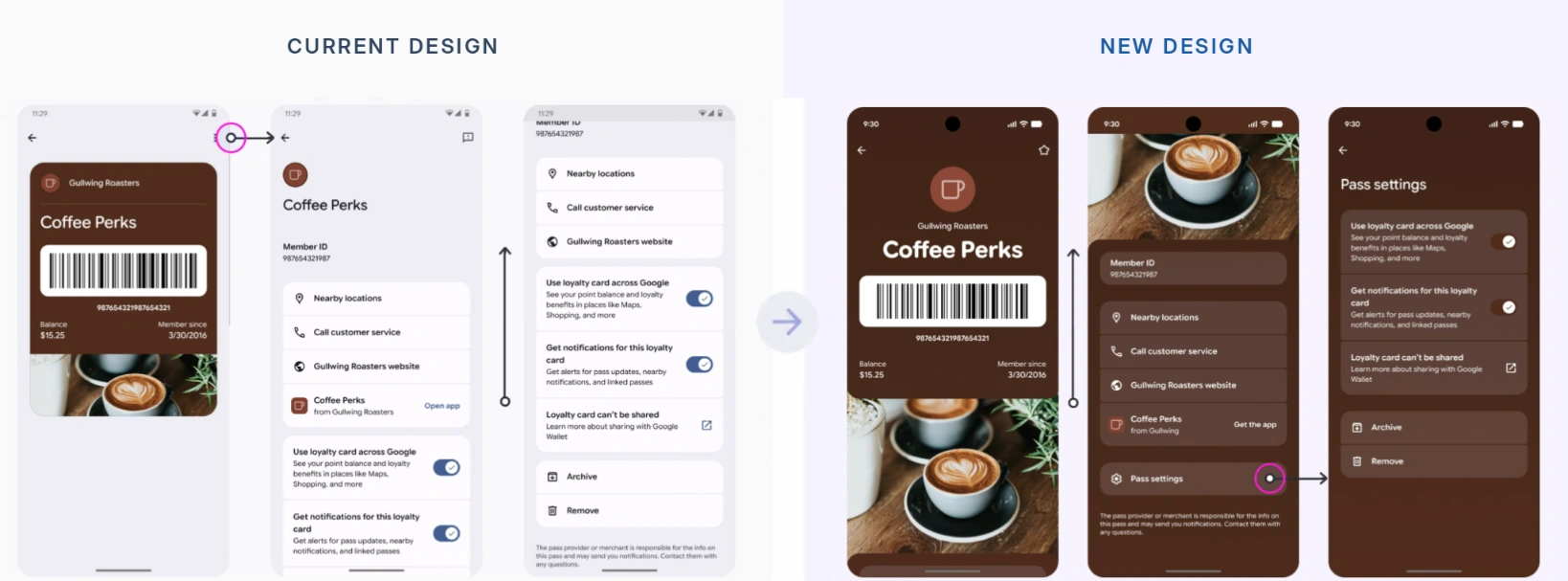
Google Wallet loyalty pass layouts showing the member barcode, balance and settings.
How PassKit supports digital loyalty rewards
PassKit creates and manages loyalty passes that customers can save in Apple Wallet and Google Wallet. A pass can contain a member identifier, scannable code, points balance, tier and available-reward information, giving the customer an accessible view without a separate loyalty-app download.
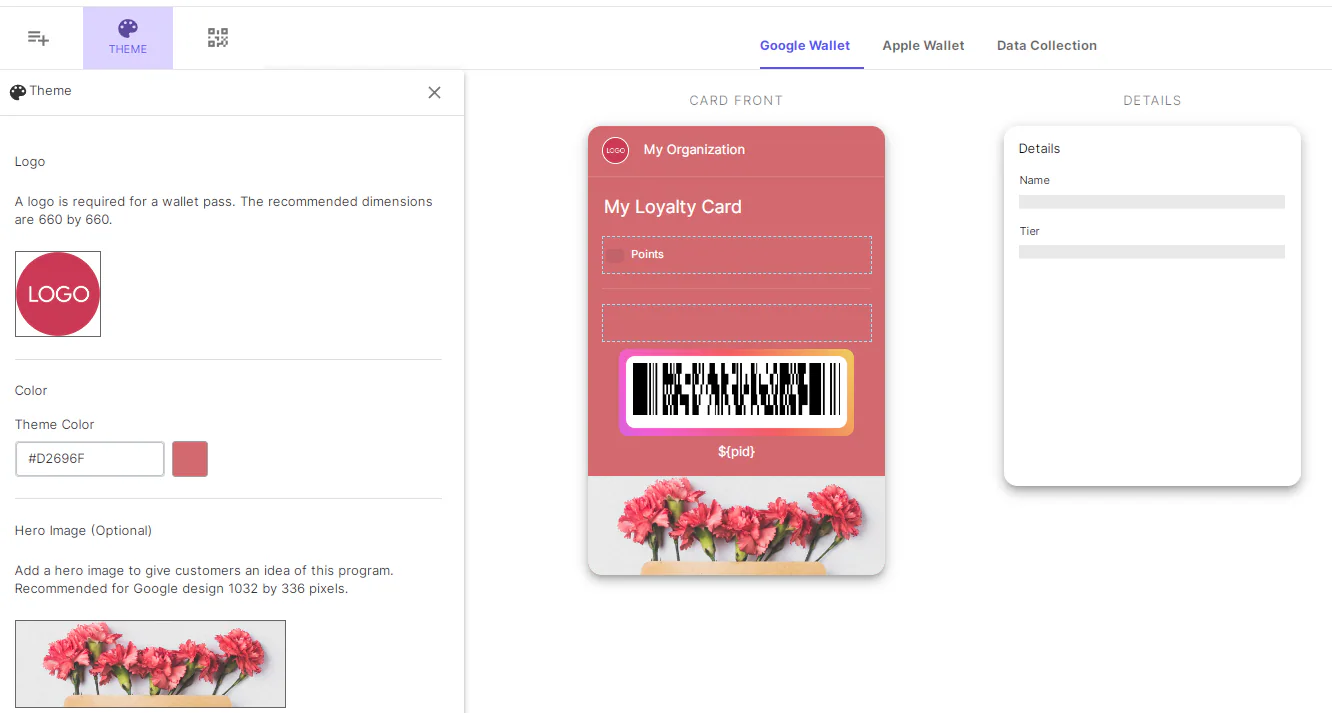
Passes can be updated after issuance. In an integrated setup, the business’s master system can calculate eligibility or a new balance and send the resulting data to PassKit for delivery to the customer’s wallet. PassKit’s integration planning guidance recommends defining the master system and keeping business logic and records consistent.
Other configured workflows are possible. Employees can use PassReader to scan a member and adjust points, while APIs, SDKs or automation tools can connect PassKit records with POS, CRM and ecommerce activity. The chosen workflow determines where points are recorded and how purchases, corrections and redemptions are confirmed.
The wallet pass itself does not detect a purchase. It presents the identifier and current information supplied through the configured workflow. PassKit also tracks pass-lifecycle events such as issuance, installation, updates and deletion; transaction or redemption visibility depends on the scanning or integrated tools used.
If wallet-based loyalty delivery fits your operating model, you can start a 45-day PassKit trial and test the full employee and customer workflow before launch.
Frequently asked questions about loyalty reward apps
What does a loyalty reward app do?
It connects member identification with earning rules, balance or progress records, reward eligibility and redemption. The functions may be contained in one product or shared across a loyalty application, POS, ecommerce platform and customer-facing interface.
How does a loyalty reward app track points?
An eligible event is associated with a member, the established earning rule is applied and the resulting change is recorded. The system should retain enough transaction or adjustment history to explain the current balance.
Can customers collect rewards without downloading an app?
Yes. Businesses can use web accounts, checkout lookup, physical credentials or Apple Wallet and Google Wallet passes. The available options depend on the loyalty product and the identification workflow.
How do loyalty apps calculate reward balances?
The responsible system applies the program’s rules to confirmed purchases or other eligible events, then adds or deducts the relevant amount. A customer-facing app or pass may display that result without being the system that calculated it.
How are loyalty rewards redeemed?
The business identifies the member, verifies eligibility, applies the benefit, confirms the outcome and updates the reward status or balance. The exact steps depend on whether redemption occurs through a POS, ecommerce checkout, scanner or staff-managed application.
Can loyalty points update automatically?
Yes, when a configured POS, ecommerce or other integration sends the necessary event and the loyalty workflow processes it. Without that connection, an employee may need to record the earning or adjustment manually.
What happens to reward points after a refund?
That depends on the program’s policy and software configuration. Many businesses reverse the points earned by the refunded purchase, but they also need a policy for cases where those points have already been redeemed.
Do loyalty reward apps require POS integration?
No. Simple programs can use staff-assisted scanning or manual points and stamps. POS integration is useful when rewards must respond automatically to transaction value, purchased items, refunds or activity across multiple sales channels.