
Mobile Loyalty Apps: How Customers Join and Use Rewards
Improve the mobile loyalty customer journey from signup to redemption, with practical wording, recovery routes and measurable experience checks.
A mobile loyalty app gives customers a way to join a rewards program, identify themselves, check progress and use benefits on their phone. That experience can be delivered through a branded native app, a shared app, a mobile web account or a pass in Apple Wallet or Google Wallet.
The useful test is whether a new customer can complete the whole journey and return to it later. A clear reward, an accessible membership and predictable checkout matter at every visit. This guide focuses on that customer experience; use the best loyalty program apps comparison when choosing between providers.
Does mobile loyalty require a separate app download?
No. Choose the access format around the jobs customers need to complete and how frequently they interact with the business.
| Access format | What the customer uses | Choose it when | Friction to test |
|---|---|---|---|
| Branded native app | One brand’s installed iOS or Android app | Ordering, account services or other frequent interactions justify an application | Installation, login and finding the loyalty card inside the app |
| Shared loyalty app | An installed app containing several participating programs | The shared experience fits the business and its audience | Finding the correct merchant and understanding which rewards belong to it |
| Mobile web account | A browser-based member area | Customers need account access through a website or link | Returning to the correct page and signing in on a phone |
| Apple Wallet or Google Wallet pass | A saved wallet credential | Fast access to membership information and an identifier is the main task | Saving the pass, finding it later and using it with the supported checkout |
A wallet pass is a saved credential, while a native app can contain a broader range of services. Check that the required wallet is available on the customer’s device and provide another access route where needed. If contactless presentation is part of the plan, test the pass, device and checkout equipment together.
The interface shows the member’s information; the business’s connected system or staff workflow records qualifying activity and applies reward rules. Our loyalty reward app guide explains those mechanics. The customer should see a consistent result wherever they access the membership.
The mobile loyalty customer journey
Use a complete journey to evaluate the experience. Each stage should leave the customer knowing what happened and what to do next.
| Stage | Customer’s question | Successful outcome |
|---|---|---|
| Discover | Why should I join? | The invitation names a useful benefit and its basic conditions |
| Enroll | What information do you need? | A short form explains required details and confirms membership |
| Return to membership | Where is my card or account? | The customer can find the existing membership on a later visit |
| Identify and earn | Did this purchase count? | The member is recognized and receives a clear earning confirmation |
| Check progress | What can I use, and what comes next? | Available rewards and remaining progress are understandable |
| Redeem | What do I show or select? | The reward is applied and its changed status is confirmed |
| Recover access | How do I get back to my membership? | The customer regains the existing account or credential through a supported route |
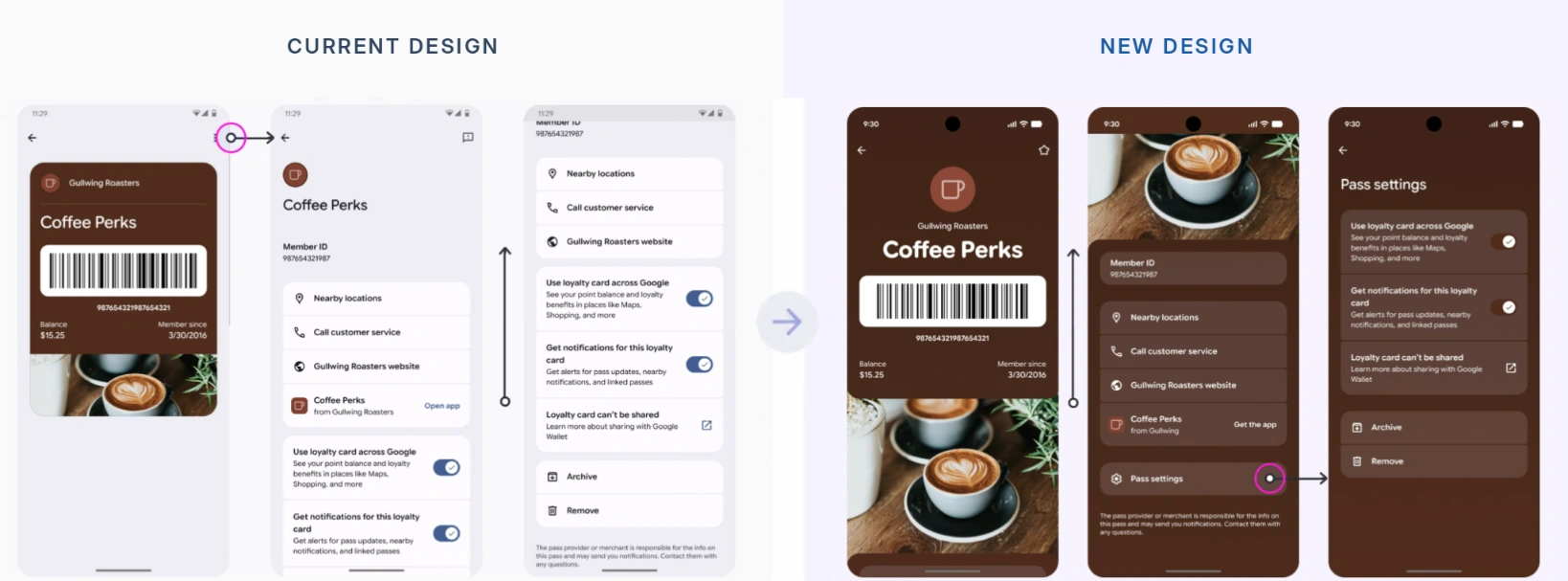
Google Wallet layout comparison showing how customers access their loyalty identifier, balance and pass settings.
Example: a bakery customer’s journey
Consider a bakery offering a free regular coffee after nine paid regular coffees. A customer buying one qualifying coffee per visit follows this experience:
- A counter sign states the offer and provides a signup QR code. After joining, the customer sees how to save or open their membership.
- At the first purchase, staff identify the member before completing the earning step. The customer sees “1 of 9 coffees recorded. Eight more until your free regular coffee.”
- On the ninth qualifying purchase, the interface changes to “Your free regular coffee is ready” and explains how to redeem it.
- On a later visit, the customer presents the membership and asks to use the reward. Staff apply it, confirm redemption and show the updated progress.
- When the customer later replaces their phone, a supported recovery route restores access to that same membership.
Follow one member through all five steps when testing. A successful signup alone does not show whether finding the card, earning and redemption will feel straightforward.
Make four moments easier for customers
1. Join and find the membership again
Before requesting details, explain the reward, qualifying activity and where the customer will use the membership. Mark required and optional fields clearly. A simple visit reward may need little profile information at the start; collect additional details when there is a defined reason for them.
Present participation terms and relevant communication choices clearly. The final screen should provide a useful next action: save the pass, open the account or present the identifier. Include a return route in an appropriate confirmation message so customers can find the existing membership later.
For a branded app, test how many screens separate opening it from showing the card. For a browser account, test the return link and login. For a wallet pass, have a new customer save it and find it again after closing the enrollment page.
2. Identify and earn at checkout
Tell customers when to present their identifier. “Show before paying” is clearer than leaving them to discover afterward that the purchase was not linked to their account.
The employee should recognize the member without creating another membership. The customer then needs confirmation that the eligible activity was recorded, through a receipt, screen, account or other supported channel.
If earning is processed later, show a pending state or an expected update window that matches the actual process. Staff should know how to handle a missing purchase, including which receipt or transaction reference is needed to investigate it.
3. Understand progress and use the reward
Show available rewards separately from pending points or progress toward the next benefit. A points balance becomes more useful when customers can see what it unlocks or where to view reward choices.
Before redemption, make the benefit, eligible purchase and important restrictions visible. At checkout, confirm which reward is selected, whether it applies, that the benefit was used and what remains afterward. A customer should not have to interpret a technical error to learn that a reward has expired or a product is excluded.
Use readable labels, sufficient contrast and a code that works with the intended scanner. Test long names, larger supported text settings and the experience of a customer hurriedly presenting a phone at the counter.
4. Return without starting again
A returning customer should use the same member record. Keep the access route recognizable, preserve useful account links and explain how to update an email address or phone number through the supported process.
If the customer cannot find the card, staff should first locate the existing membership using the approved lookup method. Registering them again can split progress across accounts. Explain the recovery route in customer-facing help and give employees a clear escalation path when identity or balances are uncertain.
Use messages that tell customers what to do next
A useful message explains a meaningful state or action. Keep the offer and language consistent across the mobile view, checkout, receipt and support response.
| Moment | Weak wording | More useful example |
|---|---|---|
| Enrollment complete | “Success” | “You’re registered. Save your loyalty card and show it before paying.” |
| Earning confirmed | “Points updated” | “Today’s coffee is recorded. Two more qualifying coffees until your reward.” |
| Update pending | An unchanged balance with no explanation | “Today’s purchase is being processed. Check your account for the updated balance.” |
| Reward available | “Congratulations” | “Your free regular coffee is ready. Show your card when ordering.” |
| Reward rejected | “Unavailable” | “This reward applies to a regular coffee. Ask staff about the eligible choices.” |
| Recovery | “Create an account” | “Already a member? Use the recovery link or ask staff to locate your membership.” |
Match specific timing and instructions to the implemented workflow. If updates normally finish within a known period, state that period; if the system cannot give a reliable estimate, provide a clear support route.
Notifications can draw attention to a changed balance, available reward or approaching expiry. Keep the same information accessible when the customer opens their account or pass, so the experience still works when a message is missed.
A native app, a web account, email, SMS and wallet notifications have different permissions and delivery behavior. Apple’s loyalty pass guidance describes alerts about changes to loyalty information. Google Wallet’s notification documentation defines supported messages and updates. Select a supported channel, respect customer choices and test the resulting experience on real devices.
Give common problems a clear recovery route
Decide what the customer should try, what staff can do and when a query needs escalation. Keep requests proportionate to the problem and protect the member’s information during lookup.
| Problem | Customer-facing next step | Staff action |
|---|---|---|
| New phone or missing pass | Open the supported recovery or original access route | Locate the existing membership and help restore access |
| Forgotten login or different email | Use account recovery or contact support | Follow identity checks and the account-update process |
| Unreadable code | Try the supported alternative identifier | Use an approved lookup method and check the display or scanner |
| Purchase missing from progress | Provide the date, location and receipt reference | Investigate the recorded transaction before correcting progress |
| Reward cannot be used | Read the specific reason and eligible conditions | Confirm the reward and basket, then resolve or escalate the query |
| Old or conflicting balance | Check the account or ask for help | Compare the relevant records and correct the cause of the mismatch |
A saved credential may remain visible during poor connectivity, while current status checks or redemption may still need a connection. Give staff an agreed fallback that explains what can proceed, what must wait and how the customer will receive a resolution.
Assess the experience with tasks and measurable outcomes
Use enrollment and checkout records for completion rates, and observed task tests for finding and presenting membership. Choose definitions you can apply consistently.
| Measure | How to define it | What it helps reveal |
|---|---|---|
| Enrollment completion | Successful enrollments divided by enrollment flows started in the same channel and period | Unnecessary fields, unclear choices or technical failures |
| Time to find membership | Time from asking a returning member to show the card until it is ready to present | Login, navigation or saved-pass discovery problems |
| Redemption completion | Successfully applied rewards divided by recorded redemption attempts in a defined period | Unclear eligibility, checkout friction or staff confusion |
| Access-related support | Requests about missing cards or login recovery, classified consistently | Whether the return and recovery routes are understandable |
| Duplicate memberships | Confirmed duplicate records found during lookup or support | Unclear rejoining, identity matching or recovery procedures |
Observe new and returning customers using the devices and channels your audience actually uses. Ask them to explain the reward in their own words. Then test an unreadable code, delayed update and unavailable reward with the staff who handle normal service.
Record where the customer hesitates and what explanation the employee must add. Fix a confusing label, missing return link or unsupported checkout step, then repeat the same task. Use your own baseline to assess improvement.
Keep the journey table as a short acceptance checklist. Each stage should have a visible success state and a sensible next step when it fails. When you are ready to configure the underlying systems, the loyalty program app implementation guide covers that work in more detail.
How PassKit supports mobile loyalty access
PassKit creates, issues and manages digital loyalty passes for Apple Wallet and Google Wallet. Customers can receive a link or scan a QR code, complete the required enrollment and save a pass showing supported member, balance, tier or reward information.
Connect pass updates to the appropriate business records or staff workflow. PassKit’s integration planning guidance explains identifying the master system and deciding which data moves between services.
For staff-assisted programs, PassReader supports scanning and validation of compatible PassKit passes. Authorized staff can use its configured points-management workflow where appropriate.
Test the full customer journey during PassKit’s 45-day trial: joining, finding membership again, earning, checking progress and redeeming. Include the employee’s actions and the support route alongside the customer’s screen.
Frequently asked questions about mobile loyalty apps
Do customers have to download a dedicated loyalty app?
No. A mobile web account or compatible wallet pass can provide access without a separate merchant application. Choose the format around the services customers need and the devices they use.
Can the same membership work online and in-store?
Yes, when both channels use a consistent member record and the required purchase and reward information. Test earning and redemption across both channels with one test member.
What happens when a customer changes phones?
They should follow the recovery route supported by the chosen account or wallet setup. Help them regain the existing membership and progress through that route.
Can a mobile loyalty card work without internet access?
A saved credential may remain visible, but updates, current-status checks and redemption can require connectivity. Tell customers and staff how the program handles an unavailable connection.
Can a wallet pass replace a branded loyalty app?
It can provide a simpler access method when the main task is presenting membership and viewing supported information. A business combining ordering, bookings or interactive services may still need an app or portal alongside it.