
How to Create a Loyalty Program App for Your Business
Learn how to create a loyalty program app by defining requirements, connecting customer and transaction data, testing rewards and preparing for launch.

Creating a loyalty program app requires more than designing a digital card or opening a software account. A working implementation must connect the correct customer to eligible activity, maintain dependable program records, support employees at checkout and handle earning, redemption, refunds and failed updates.
This guide explains how to create a loyalty program app from an agreed concept. The ten steps take you from a short implementation brief through data ownership, workflow configuration, testing, staff preparation and launch. They apply whether you configure an existing loyalty platform, connect loyalty to a POS or deliver the customer-facing experience through a native app, web account or mobile wallet pass.
If you are still selecting software, start by comparing loyalty program apps for small businesses. The process below assumes you are ready to define how the chosen approach will operate.
What you need before creating a loyalty program app
Implementation should begin after the basic commercial decisions are substantially agreed. Otherwise, technical work stalls while people continue debating the offer.
Before configuration starts, confirm:
- Business objective: State the behavior the program is intended to encourage, such as more frequent visits or repeat purchases.
- Reward structure: Agree whether members earn points, stamps, tiers or another defined benefit.
- Reward affordability: Confirm the business can fund the offer under realistic participation and redemption assumptions.
- Program terms: Document eligibility, exclusions, expiry, refund treatment and important restrictions.
- Implementation owner: Give one person responsibility for decisions, progress and issue escalation.
- Sales scope: List the participating locations, websites, checkout systems and other channels.
These are prerequisites, not the subject of this guide. If the offer still needs designing, use our guide to starting a rewards program for a small business before implementing the application.
What are you actually creating?
“Loyalty program app” can describe several different delivery approaches. Choose the approach before assigning technical work because each creates different responsibilities.
| Approach | What the business implements | Main operational consideration |
|---|---|---|
| Custom application | A dedicated customer interface plus the accounts, loyalty logic, administration and integrations behind it | Requires product development, releases, maintenance and support across the chosen platforms |
| Existing loyalty or POS platform | A configured program inside established software, using its supported customer and staff interfaces | Faster configuration, but workflows and data access remain subject to the platform’s capabilities |
| Mobile wallet loyalty experience | An Apple Wallet or Google Wallet pass connected to the systems that identify members and manage program information | Avoids a separate customer download, but the pass does not become the transaction or loyalty-processing system by itself |
A web account or POS-linked customer profile can also provide the customer-facing access. Some implementations combine formats—for example, an ecommerce account plus a wallet pass—but all formats should refer to consistent member and reward records.
A wallet pass is not a native mobile app. Apple describes loyalty passes as a complement or alternative access point for customers without the business’s app, with support for identifiers and dynamic information in Apple Wallet. If you need a deeper build-versus-buy assessment, see our guide to alternatives to building a loyalty app.
How to create a loyalty program app
The following ten steps turn the agreed program into an implementation that can be tested and launched. Each step produces a practical output that the next stage can use.
1. Write the implementation brief
Begin with a one-page description of what the first working version must accomplish. This keeps an appealing but nonessential feature from delaying the launch.
Record:
- the program objective and intended members;
- participating locations and sales channels;
- the existing POS, ecommerce, CRM or customer systems;
- the agreed reward model and major restrictions;
- the customer-facing delivery format;
- essential launch capabilities and features deferred until later; and
- the owner of each business and technical decision.
Use observable requirements. “Improve engagement” is not an implementation requirement. “A registered member can earn points on eligible in-store and online purchases and redeem an available discount at either checkout” is testable.
Also define what is outside the first release. Referrals, tiers, gamification or advanced segmentation can be added later if the initial program does not depend on them.
Output: An approved brief describing the scope, owners, systems and minimum working journey.
2. Choose the customer delivery format
Select how members will join, identify themselves and view the information intended for them. The format changes what must be built, configured and supported.
A dedicated app needs account access, device support, app-store distribution and ongoing releases. An existing loyalty platform provides predefined interfaces and workflows. A web account needs a responsive sign-in experience. A wallet pass needs distribution, a member identifier and a process for updating the displayed information.
Do not choose only by appearance. Check what happens at the counter or online checkout:
- Can employees or systems identify the member quickly?
- Can customers recover access after changing phones or contact details?
- Which devices and sales channels must be supported?
- Is a fallback available if a barcode, account or connection fails?
- Who supports customers when they cannot access their credential?
If you are configuring commercial software, verify that the chosen format is included in the plan and works with the business’s actual systems.
Output: A delivery-format decision covering customer access, employee interaction, supported devices and fallback access.
3. Define member identity and data ownership
Every member needs a stable identifier that connects activity to the correct record. It might be an account ID, membership number, phone number or a unique value encoded in a barcode. Contact details can change, so avoid treating an email address or phone number as the only permanent identifier unless the system is designed to manage those changes safely.
Next, decide which system owns each important record. The “source of truth” is simply the place your business accepts as authoritative when two systems disagree.
Document ownership for:
| Record | Decision required |
|---|---|
| Member profile | Where the primary customer and membership record is maintained |
| Marketing permission | Where consent, source and date are recorded |
| Transaction | Which POS or ecommerce system confirms the purchase |
| Points or stamps | Which system holds the authoritative balance |
| Reward eligibility | Where available, expired and used status is decided |
| Redemption | Which system confirms that the benefit was applied |
| Customer display | Which app, account or pass shows the current information |
A small program may keep several records in one product. A larger implementation may distribute them across a POS, CRM, loyalty engine and customer-facing application. Either can work if identifiers and responsibilities are explicit.
Define how duplicate registrations are detected and merged, who can correct a mismatched record and what happens when two channels submit activity for the same member.
Output: A record-ownership and identifier map understood by operations and technical teams.
4. Convert reward rules into configuration requirements
The commercial rules now need precise system behavior. Ambiguity at this stage leads to inconsistent awards and manual corrections later.
For each earning action, specify:
- the event that qualifies;
- eligible locations, channels, products and customers;
- the amount or number of points or stamps awarded;
- excluded products, discounts, taxes or fees;
- rounding and minimum-spend treatment;
- whether pending transactions earn immediately; and
- what reverses the award.
For each reward, specify the threshold, validity period, permitted channels, applicable products, combination rules and whether partial redemption is allowed. Define how expiry is calculated and which timezone applies.
Use a configuration sheet with examples. If the rule is “one point per eligible dollar,” include examples for a normal basket, an excluded item, a refund and a discounted transaction. The purpose is not to redesign the economics; it is to remove doubt about what the application should do.
Our points reward system guide covers program design and management in more depth. Here, the agreed rules become acceptance criteria for configuration and testing.
Output: A rule sheet that states the expected result for normal and exceptional transactions.
5. Map customer enrollment and identification
Define the enrollment path from invitation to usable membership. Record where the customer starts, which information is required, which terms they accept and when the member record and credential are created.
Participation consent and marketing consent should be handled deliberately. Joining a loyalty program does not automatically mean the customer has agreed to every promotional channel. Store the relevant consent record and provide the required choices for the markets where the program operates.
Then map identification at each checkout:
- in-store barcode, QR code, NFC or account lookup;
- ecommerce login or linked customer account;
- phone or email lookup where permitted;
- employee-assisted recovery if the credential cannot be presented; and
- duplicate-account handling if a customer registers again.
Identification must happen early enough for the transaction to reach the correct member. Test common failure cases: the code will not scan, the customer uses a new phone, a cashier selects the wrong profile, or an online order uses a different email address.
Output: Enrollment and identification flows for every participating sales channel, including recovery and duplicate handling.
6. Configure earning and redemption workflows
Turn the rule sheet into responsibilities for the checkout, loyalty system, customer interface and employee.
For earning, establish:
- how the member is identified;
- which completed event triggers the award;
- where eligibility and the amount are calculated;
- where the new balance is recorded; and
- how the customer-facing view receives the update.
For redemption, establish who verifies the member and available reward, where the benefit is applied, when the redemption becomes final and which record is updated. Deducting a reward before the checkout successfully applies it can create a missing-benefit dispute. Applying the benefit without closing the reward can permit repeated use.
The precise workflow differs by platform. Keep one owner responsible for the completed outcome even when several systems participate. For a fuller explanation of the underlying functions, read how loyalty reward apps track and redeem rewards.
Output: Approved earning and redemption workflows showing the responsible system or employee at each stage.
7. Connect the required systems
Not every implementation needs a complex integration. A staff-managed stamp program might use one merchant application. A program spanning stores and ecommerce may need transactions, customer IDs, balances and redemptions synchronized across several systems.
Create an event map before connecting anything:
| Event | Information required | Destination | Expected timing | Failure owner |
|---|---|---|---|---|
| Member created | Member ID and approved profile fields | Loyalty system and customer interface | During or shortly after enrollment | Customer operations |
| Eligible sale completed | Transaction ID, member ID and eligible value | Rules or balance system | After confirmed payment | Commerce or POS team |
| Refund completed | Original transaction ID and reversed value | Balance system | After confirmed refund | Finance or operations |
| Reward redeemed | Member ID, reward ID and checkout result | Redemption record and customer interface | After benefit is applied | Store or ecommerce operations |
| Balance corrected | Member ID, adjustment and reason | Authoritative balance and customer interface | After approval | Program manager |
The transaction ID is particularly useful for preventing the same sale or refund from being processed twice. Define retry behavior and monitoring so delayed or failed updates are visible rather than silently lost.
Use the method supported by the systems involved: a native connection, plugin, API, SDK, webhook or an automation service. The dedicated loyalty program integration guide covers connection options in more detail.
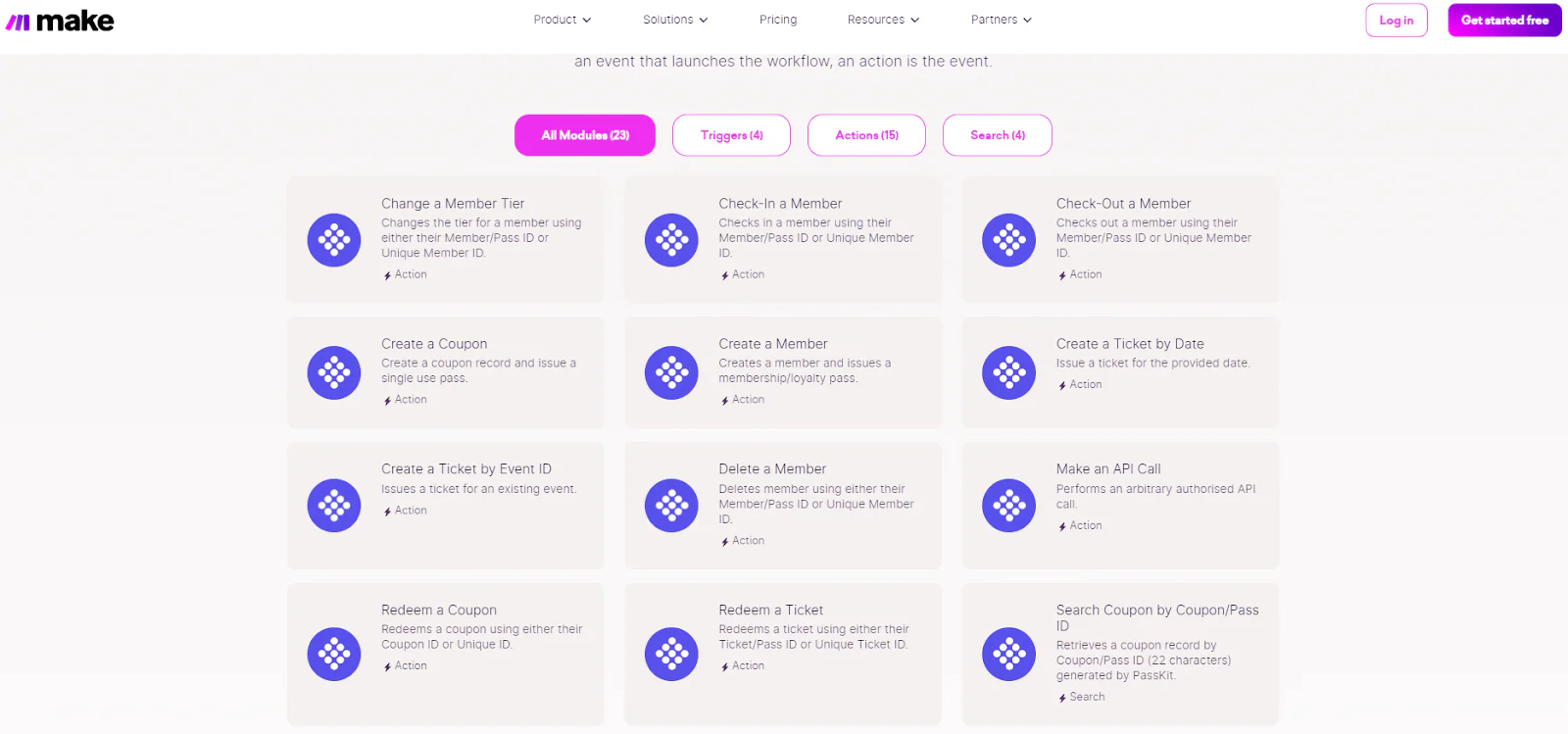
PassKit integration actions available in Make.
Output: A working event map with tested connections, expected timing and named failure owners.
8. Define exceptions and staff permissions
A launch-ready application needs procedures for transactions that do not follow the happy path. Decide what the software does and what employees are allowed to do when:
- a purchase is refunded after points were awarded;
- points reach the wrong account;
- the same event arrives twice;
- a customer attempts to reuse a reward;
- a pass or code cannot be scanned;
- an update is delayed;
- the POS or loyalty service is unavailable; or
- a reward is applied but its status fails to update.
Limit manual balance changes and redemptions to appropriate roles. Record the employee, time, reason and before-and-after value for corrections. Frontline employees need a quick recovery path, while higher-risk adjustments may require a manager.
Define an offline or outage policy. For example, the business might retain the receipt for later review rather than making an unrecorded award. The correct choice depends on risk and customer-service expectations, but employees should not invent a different solution during each outage.
For technically demanding validation, review the controls discussed in the guide to real-time redemption tracking.
Output: An exception matrix defining allowed actions, permissions, audit records and escalation routes.
9. Test complete customer transactions
Test with the real devices, checkout versions, scanners and accounts employees will use. A successful customer screen is not proof that the transaction, balance and redemption records agree.
Your test plan should include:
| Scenario | A successful test demonstrates |
|---|---|
| New enrollment | One member record and the intended customer access are created |
| Existing member identification | The correct account appears without creating a duplicate |
| Eligible purchase | The award is calculated once and reaches the right member |
| Ineligible purchase | Excluded activity does not earn |
| Reward threshold | Eligibility changes at the agreed value |
| Successful redemption | The benefit is applied and the reward or balance closes correctly |
| Insufficient balance | The reward is rejected without changing the account |
| Full or partial refund | The agreed reversal occurs against the original transaction |
| Duplicate event | A repeated message or scan does not create a second award |
| Failed or delayed update | The issue is visible, recoverable and does not corrupt the record |
| Manual correction | An authorized employee can correct the record with an audit trail |
| Service outage | Staff follow the approved fallback and reconciliation process |
Record the expected and actual result, tester, device, location and evidence. Retest after fixing a failure, and run the connected scenarios again when a change affects shared records.
Before approval, reconcile the POS or ecommerce transaction, authoritative loyalty record and customer-facing display for the same test member.
Output: A signed test record showing that normal, failed and exceptional transactions behave as approved.
10. Train staff, pilot and launch
Write short role-based instructions. Cashiers need to identify members, apply rewards and follow the fallback process. Managers may need to approve corrections and investigate mismatches. Customer-support staff need to recover access, find a member and explain delayed updates without exposing information improperly.
Include screenshots only if they match the final interface. Train with the same test scenarios used during acceptance, especially an unreadable code, incorrect account and failed redemption update.
Pilot with a limited audience, location or sales channel when practical. During the pilot, track enrollment failures, identification problems, duplicated records, delayed awards, rejected redemptions, manual corrections and support questions. These operational signals reveal whether the implementation is ready to expand.
Before the wider launch:
- confirm owners and support coverage;
- verify production credentials and permissions;
- remove or clearly separate test accounts;
- confirm monitoring and reconciliation schedules;
- publish accurate program terms and customer instructions; and
- agree who can pause the program if records become unreliable.
After launch, review exception logs and customer reports regularly. A loyalty application remains an operational system: rule changes, new locations, software updates and staff turnover all require controlled maintenance.
Output: Trained teams, an approved pilot, a support process and a documented launch decision.
Loyalty program app launch-readiness checklist
The implementation is ready when the business can provide evidence for each requirement—not merely say the feature exists.
| Requirement | Ready when |
|---|---|
| Scope | The first release and deferred features are approved |
| Program rules | Normal, excluded, refund and expiry examples have expected results |
| Member identity | Every channel uses or maps to a stable identifier |
| Data ownership | An authoritative system is named for members, transactions, balances and redemptions |
| Customer access | Enrollment, viewing and recovery work on supported devices |
| Staff workflow | Employees can earn, redeem and escalate without improvised steps |
| Integrations | Required events arrive once, within the accepted time, with visible failures |
| Permissions | Sensitive corrections and redemptions are restricted and recorded |
| Testing | Normal and exception scenarios pass on production-like equipment |
| Support | Owners, escalation routes and reconciliation procedures are documented |
| Pilot | Realistic use produces acceptable error and support levels |
| Launch | The implementation owner and operational stakeholders approve expansion |
Example: implementing a wallet-based retail loyalty program
Consider a small retailer that has agreed to award one point per eligible dollar and offer a $5 discount for 100 points. It wants customers to use an Apple Wallet or Google Wallet pass rather than download a dedicated app.
The retailer makes these implementation decisions:
- The POS owns customer records, completed transactions and the authoritative points balance.
- Each member receives a stable ID stored in the POS and encoded in the wallet-pass barcode.
- The cashier scans the pass before completing the sale, linking the purchase to the correct member.
- After payment, the POS calculates points from eligible items. A configured integration sends the updated balance to the wallet-pass platform.
- The pass displays the member ID, current balance and available reward information; it does not detect the purchase itself.
- At redemption, the cashier identifies the member, the POS verifies the 100-point requirement, applies the discount and records the redemption. The resulting balance is then sent to the pass.
- A refund refers to the original transaction so the agreed points reversal is applied once.
- Managers can correct balances, but the system records who changed the value and why.
Before launch, the retailer tests an eligible basket, excluded product, duplicate transaction message, full refund, sufficient and insufficient redemption, failed pass update and unreadable barcode. Staff also practise the approved fallback when the integration is unavailable.
The example would work differently if a loyalty platform managed the points record or employees used a separate scanning application. The principle remains the same: assign ownership, connect events, test the complete result and never assume the customer-facing credential knows what was purchased.
How PassKit fits a loyalty program app implementation
PassKit can provide the Apple Wallet and Google Wallet layer of a loyalty implementation. Businesses can create and distribute passes containing member identifiers, barcodes or QR codes and relevant loyalty information, then update that information after issuance.
PassKit’s integration planning guidance recommends mapping fields and triggers while defining the master system that controls the business data. APIs, SDKs, webhooks and configured automation tools can connect pass records to POS, CRM, ecommerce or loyalty systems.
For a staff-assisted workflow, PassReader can scan a member and manage points when the program and employee permissions are configured for that purpose. That does not mean every scan identifies a purchase automatically. The business still defines what the scan represents, which action is allowed and where the result is recorded.
PassKit does not turn Apple Wallet or Google Wallet into a POS or a native customer application. A wallet pass is the accessible customer-facing credential; purchase recognition and automation depend on the implementation around it.
If that delivery model fits your brief, start a 45-day PassKit trial and use test members and transactions to validate the entire workflow before launch.
Frequently asked questions about creating a loyalty program app
Do I need coding skills to create a loyalty program app?
Not necessarily. Existing loyalty, POS and wallet-pass platforms can support configuration without developing a native app. Coding or specialist integration work may be required when systems lack a native connection or the business needs custom logic and interfaces.
Can I create a loyalty app without building a native application?
Yes. A business can use an existing platform, web account, POS-linked customer profile or Apple Wallet and Google Wallet passes. Each approach has different customer-access, data and operational requirements.
What systems does a loyalty program app need?
At minimum, the implementation must identify members, record eligible activity, maintain the necessary loyalty records and provide customer and staff access. One product may perform several jobs, or a POS, CRM, loyalty platform and customer interface may share them.
Where should loyalty points and member records be stored?
Store each authoritative record in a system designed to maintain it consistently, control access and support correction or export. Name the owner for member profiles, transactions, balances and redemptions before connecting systems.
How long does loyalty app implementation take?
It depends on the delivery format, rule complexity, existing data, required integrations, approval process and testing. A configured staff-assisted program is different from a custom application spanning multiple checkout systems. Estimate after the implementation brief and event map are approved.
How should I test earning and redemption?
Use production-like customer accounts, devices and checkout equipment. Test successful and excluded purchases, thresholds, insufficient balances, redemption, refunds, duplicate events, delayed updates and authorized corrections. Compare the transaction, loyalty record and customer display.
Can I launch without POS integration?
Yes, if employees have a controlled method to identify members and record eligible activity, such as a configured merchant or scanning application. Document the additional staff steps and verify that the process remains accurate during busy periods.
What should staff know before launch?
Staff should know how to enroll or identify members, award and redeem correctly, handle an unreadable credential, follow outage procedures, protect customer information and escalate corrections they are not authorized to make.
Should I pilot the application before expanding?
Usually. A limited pilot exposes identity, training, integration and support problems with less operational risk. Define the pilot’s acceptance criteria and resolve material record or redemption errors before wider rollout.