
Digital Membership Card Apps: How to Choose the Right Option
Compare dedicated membership apps, shared apps, member portals and Apple Wallet or Google Wallet cards. Find the right option for your organization.

A digital membership card app gives members a way to access and present their membership credentials on a phone. But the term can describe several different solutions: a dedicated mobile app, a shared membership app, a member portal or a card saved in Apple Wallet or Google Wallet.
These options serve different purposes. Some provide quick access to a membership card, while others let members renew subscriptions, book activities, manage their profiles or access exclusive content.
The right choice depends on what your members need to do—not simply which platform offers the most features.
If you’re a member looking to download an existing membership card, your organization normally determines which app, portal or wallet option you can use. If you’re choosing a solution for an organization, this guide compares the available approaches, their limitations and the questions worth answering before committing to one.
What is a digital membership card app?
A digital membership card app is a mobile application or digital service that lets members access a membership credential electronically.
Depending on the solution, members might open a dedicated application, sign in through a website or present a card stored in their phone’s digital wallet.
The credential itself typically identifies the member and may display information such as:
- Member name or number.
- Membership type or tier.
- Current membership status.
- Expiration date.
- A QR code or barcode for identification.
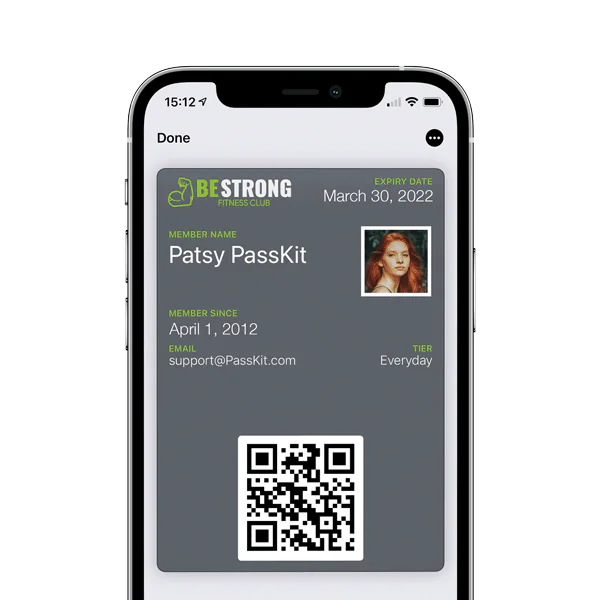
The important distinction is between the way members access their cards and the software that manages their memberships.
For example, a digital card might display an expiration date, but it doesn’t necessarily process renewal payments or decide whether someone’s subscription remains active. Those functions may belong to a separate membership management system.
Similarly, a mobile application can display membership information without being responsible for maintaining the organization’s membership database.
Understanding these responsibilities is useful because software described as a digital membership card app may offer very different capabilities.
Four ways members can access digital membership cards
Organizations have several options for delivering membership credentials to members.
The four main approaches are dedicated branded apps, shared membership apps, mobile web portals and digital wallet passes.
1. Dedicated branded membership apps
A dedicated membership app is an application developed specifically for an organization.
Members download it from an app store and use it to access the organization’s services.
The digital membership card may be one feature among several, alongside bookings, event information, member communications, account settings or exclusive content.
This approach is worth considering when members interact with the organization frequently and have a reason to open the application beyond displaying their card.
For example, a fitness club offering regular class bookings and personalized training information may have broader application requirements than an organization whose members only need occasional identification.
The main tradeoff is the commitment involved.
A dedicated app requires development or a suitable app-building provider, ongoing maintenance, platform compatibility and member support.
Members must also be willing to install and use it.
A dedicated application can offer more interaction, but that doesn’t automatically make it the best membership-card experience.
2. Shared membership apps
Shared membership apps allow multiple organizations to issue or display membership cards through an application operated by a third-party provider.
Members download the provider’s app rather than an application developed specifically for their organization.
The eMembership Card app used by participating institutions is one example of this model.
Shared apps can be useful when an organization wants a mobile membership experience without maintaining its own application.
However, members generally need the organization to participate in the relevant service.
Installing a shared membership app does not automatically provide access to every membership someone holds.
Organizations should also consider how much control they have over card presentation, member onboarding, updates and the wider experience.
Some shared-app providers support additional wallet delivery options, while others primarily keep the credential inside their own application.
Those capabilities should be verified individually.
3. Member portals and mobile websites
A member portal is an online account area that members access through a web browser.
Depending on the organization’s software, members may be able to view their membership card, update contact information, renew their subscriptions, register for events or manage other account details.
A portal doesn’t require a separately installed mobile application.
Members typically access it through a website link, although sign-in requirements vary.
This can be an effective approach when membership administration and self-service are more important than providing a standalone app.
For example, an association whose members renew annually may benefit more from a reliable renewal portal than from an application they rarely open.
The limitation is convenience at the point of use.
If someone must sign in and navigate several screens simply to show their membership card, the experience may be unnecessarily complicated.
A portal can solve this by offering a separate digital wallet card for quick identification while retaining account-management functions on the website.
4. Apple Wallet and Google Wallet membership cards
Digital wallet membership cards are credentials that members save to Apple Wallet or Google Wallet on compatible devices.
Unlike a dedicated branded membership app, a wallet pass doesn’t require the organization to develop its own member-facing application.
Members can receive compatible passes through supported websites, emails or existing applications.
Once saved, the card can display relevant membership information, including an identifier or scannable code.
Wallet passes can also be updated after issuance when the organization or its connected systems provide new information.
For example, a supported pass may display a revised expiration date after a membership renewal.
However, a wallet pass is not a complete membership portal.
It doesn’t independently collect subscription payments, manage bookings or determine whether a membership is active.
These activities require appropriate business systems and workflows.
For organizations whose members mainly need convenient access to their credentials, mobile wallets can provide a practical alternative to building a separate application.
For implementation details, see our guide to mobile membership cards.
Which digital membership card option is right for your organization?
The best approach depends on what members need to accomplish.
An organization that primarily verifies membership at a reception desk has different requirements from one providing daily bookings, personalized services or community interactions.
The following comparison focuses on the member experience rather than attempting to compare individual software vendors.
| Option | Best suited to | Main advantage | Main limitation |
|---|---|---|---|
| Dedicated branded app | Frequent member interactions and multiple services | Combines cards with interactive organization-specific functions | Requires installation, maintenance and ongoing support |
| Shared membership app | Organizations using a third-party membership application | Avoids developing an individual branded app | Depends on the provider’s features and member experience |
| Member portal | Renewals, payments and account self-service | Members can manage their accounts through a browser | May require login and connectivity when accessing the card |
| Apple Wallet or Google Wallet | Convenient access to existing membership credentials | No separate branded app required | Interactive account-management functions need other systems |
These options are not mutually exclusive.
An organization may use a membership management platform for its records, a portal for renewals and wallet cards for identification.
The more useful question is which experience should be available when a member needs to perform a particular action.
When quick identification is the priority
If members mainly need to prove their membership, a dedicated app may be unnecessary.
A compatible wallet card or another easily accessible digital credential can provide the required information.
The organization still needs a suitable method of checking eligibility, particularly when membership status can change.
When self-service is the priority
If members frequently update account details, pay subscriptions or manage registrations, a member portal may be more appropriate.
A portal can provide access to these functions without requiring a separately installed application.
The digital membership card can remain accessible through the portal or another supported channel.
When members interact frequently
A dedicated app becomes more attractive when the organization offers services members use regularly.
Bookings, interactive content, personalized tools and ongoing community features may justify a dedicated application.
The membership card can then form part of a broader experience.
However, the organization should still consider whether members need a faster way to present their credentials without opening and navigating the full application.
Can organizations offer more than one membership card option?
Yes. An organization can support multiple member-facing channels, provided its systems are configured to keep membership information consistent.
This can be particularly useful when different activities require different experiences.
Consider an organization that already has a membership portal.
Members use the portal to renew subscriptions, update their details and view account information.
The organization could also issue compatible wallet cards so members can present their credentials without signing in to the portal whenever they arrive.
The portal remains responsible for the account-management experience. The wallet pass provides convenient access to the membership credential.
Both can reference the same underlying member record.
A similar arrangement can work with a dedicated branded app.
The application may provide bookings or member content while a wallet card offers quicker access to identification.
The important requirement is consistency.
If a member renews, changes membership level or becomes ineligible, the organization’s systems need an appropriate process for reflecting that change across supported channels.
Organizations should also plan for members who cannot or prefer not to use a particular application or compatible smartphone.
An alternative access method may still be necessary.
For a broader comparison of card formats, see Digital vs Physical Membership Cards.
What does the membership card app do, and what requires separate software?
A digital membership credential is only one part of an organization’s membership operations.
The member-facing application or wallet displays information, but other systems may be responsible for maintaining records, processing payments and determining eligibility.
Understanding these boundaries helps organizations avoid selecting a solution based on features it doesn’t actually provide.
| Responsibility | Typical system or process |
|---|---|
| Displaying a membership credential | Dedicated app, shared app, portal or digital wallet |
| Maintaining authoritative member records | Membership management system or CRM |
| Processing membership payments | Billing or payment system |
| Determining membership eligibility | Membership management system or authorized business workflow |
| Issuing and updating wallet passes | Wallet-pass issuing platform |
| Verifying membership at entry | Compatible scanner, staff application or validation system |
| Updating membership information across channels | Configured integrations or supported administrative workflows |
Some products combine several responsibilities.
For example, a complete membership management platform may include a member portal, billing functionality and digital card issuance.
Other organizations prefer to retain their existing membership software and add a separate credential-delivery service.
Neither architecture is universally better.
The decision depends on the systems already in place and the functions that need improvement.
Displaying a card is not the same as verifying membership
This distinction matters for organizations controlling entry, attendance or access to benefits.
A card might display a member’s name, number or expiration date.
However, displaying that information does not necessarily confirm that the membership is currently valid.
A member could have canceled, received a refund or had their membership suspended since the displayed information was last updated.
Where current eligibility matters, the verification process should use an appropriate authoritative record.
Scanning a QR code can identify the member, but the configured system determines whether the credential is valid and what action should follow.
Our membership check-in system guide covers these operational requirements in greater detail.
What should you check before choosing a digital membership card app?
Once you’ve identified the preferred delivery method, evaluate whether it will work for your members and staff.
These six questions are more useful than selecting a platform solely because it advertises the largest number of features.
1. What will members actually use it for?
Start with the action members need to complete.
Is the purpose to display proof of membership, enter a facility, renew a subscription or access several interactive services?
If the only requirement is convenient identification, a full branded application may introduce unnecessary complexity.
If members regularly manage bookings, payments and account information, broader application or portal functionality may be justified.
Define the required member journey before comparing providers.
2. How frequently will members use it?
Frequency affects the value of a dedicated app.
Members interacting with an organization every day may have good reasons to install an application.
Members who need their cards only a few times each year may be less willing to download and maintain another app.
Consider how quickly someone can retrieve their credential when they need it.
An experience that works well during initial enrollment may still cause friction during a busy check-in.
3. How easy is it to access the card?
Consider what happens between receiving a membership invitation and presenting the card for the first time.
Questions include:
- Must members install an application?
- Do they need to create another account?
- Is a password required every time they access the card?
- Can they retrieve it after changing phones?
- What support is available if they cannot use the normal method?
The answers matter particularly for organizations serving members with different levels of technical confidence.
An alternative access process may also be needed for people without compatible smartphones.
4. How will staff verify membership?
Displaying a card and validating membership are separate activities.
Some organizations only need staff to view a name, photo or membership category.
Others require a scanner or connected system to confirm active status, record attendance or prevent repeated use of a credential.
Before selecting a solution, establish what staff need to know at the moment of verification.
Also check what happens when connectivity is unavailable.
A saved digital card may remain accessible even when an online validation service cannot be reached.
Organizations should not assume these capabilities work identically across every app or wallet provider.
5. What happens when membership information changes?
Membership credentials need to remain useful throughout the member lifecycle.
Consider renewals, tier changes, suspensions, expired memberships and replacement credentials.
Some platforms can update the member-facing card when connected records change.
Others require administrative action or a configured integration.
The organization should establish which system maintains the authoritative membership status and how updates reach members.
It should also confirm whether staff can verify the latest status when necessary.
6. What will the solution require to maintain?
Compare the ongoing requirements, not just the initial setup.
A dedicated branded application may involve app development, operating-system compatibility, maintenance, support and member onboarding.
A shared membership app reduces some of those responsibilities but creates dependence on the provider’s application and service.
A member portal requires suitable account-management infrastructure.
Wallet passes require an issuing and updating process, together with any necessary integrations or verification tools.
The appropriate choice depends partly on which responsibilities your organization can manage reliably.
For a deeper assessment of administrative software capabilities, see Membership Software With Cards.
Where PassKit fits into a digital membership card solution
PassKit provides infrastructure for creating, issuing, managing and updating compatible membership passes in Apple Wallet and Google Wallet.
Organizations can use PassKit when they want members to access digital credentials through their mobile wallets without developing a separate branded membership application.
A PassKit membership pass can display supported member information, including identifiers, membership details and relevant status fields.
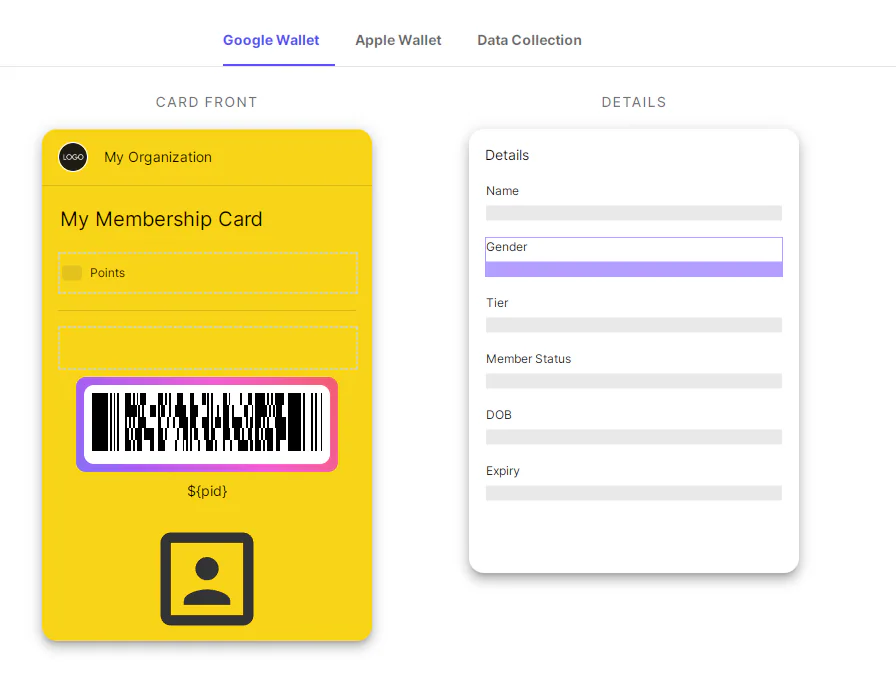
Organizations can manage these passes through supported administrative workflows or connect existing systems so updated membership information is reflected on issued credentials.
The underlying membership software remains responsible for the business processes it controls, such as subscription payments, renewal rules and authoritative eligibility records.
PassKit does not automatically replace a complete membership management platform.
It can instead provide the wallet credential component of a broader membership experience.
This approach may be particularly relevant to organizations that already have a member database or portal and want to introduce wallet-based cards without rebuilding their existing systems.
Explore PassKit’s digital membership card capabilities to see how wallet credentials can fit into an existing membership program.
Frequently asked questions about digital membership card apps
Do members need to download an app to use a digital membership card?
Not always.
Some organizations provide cards through a dedicated or shared application. Others make them available through a member portal or as compatible Apple Wallet and Google Wallet passes.
A wallet pass does not require a separate branded membership application, although members need a supported device and wallet.
The organization determines which delivery methods are available.
What is the best digital membership card app for an organization?
There is no universally best option.
An organization whose members mainly present identification may find wallet cards sufficient.
A membership organization requiring payments, renewals and account management may benefit from a member portal or broader membership software.
A dedicated application may be appropriate when members frequently access interactive services.
The best choice depends on the member experience and existing infrastructure.
Can I add an existing membership card to Apple Wallet or Google Wallet?
That depends on the card and the options supported by its issuer.
An organization can provide a compatible digital wallet pass for its membership program.
Some card-storage applications can also retain copies of existing card information or barcodes, but that does not necessarily create an issuer-managed pass or guarantee acceptance.
For a dynamically updated membership credential, look for a supported wallet option provided by the organization.
Can members use the same membership through an app and a wallet card?
Yes, when the organization supports both delivery methods and connects them appropriately.
A dedicated application may provide account-management functions while a wallet pass displays the associated membership credential.
Both should reference consistent membership information.
Supporting multiple access methods does not require creating separate memberships for the same person.
Can digital membership cards work without an internet connection?
Some saved digital credentials can remain accessible when a device is offline.
However, checking current membership status, recording attendance or synchronizing changes may require connectivity.
A portal or dedicated application may have different offline capabilities.
Organizations should test the actual member and staff experience rather than assuming that displaying a card means every connected function will remain available.
Does a digital membership card automatically update after renewal?
Not simply because a renewal payment occurs.
The relevant membership system or authorized workflow must provide the updated information to the card-issuing service.
When the systems are appropriately connected, supported digital credentials can reflect renewed status, changed tiers or updated expiration dates without requiring a newly printed card.
The exact behavior depends on the configured platform and update process.
Final thoughts on digital membership card apps
Choosing a digital membership card app starts with understanding what members need to do.
A dedicated application may be worthwhile when frequent interaction and broader services are central to the experience.
A member portal can support account management and renewals, while a shared application may suit organizations already using an established membership service.
For organizations primarily concerned with convenient access to membership credentials, Apple Wallet and Google Wallet passes may provide a simpler approach.
These options can also work together.
The strongest solution is the one that makes membership easy to access while keeping records, eligibility and verification reliable—without introducing technology that members and staff do not need.