
Apple Wallet: Create a Pass vs Official Passes
Understand Apple Wallet’s Create a Pass in iOS 27 and how it differs from an official, issuer-managed Wallet pass.
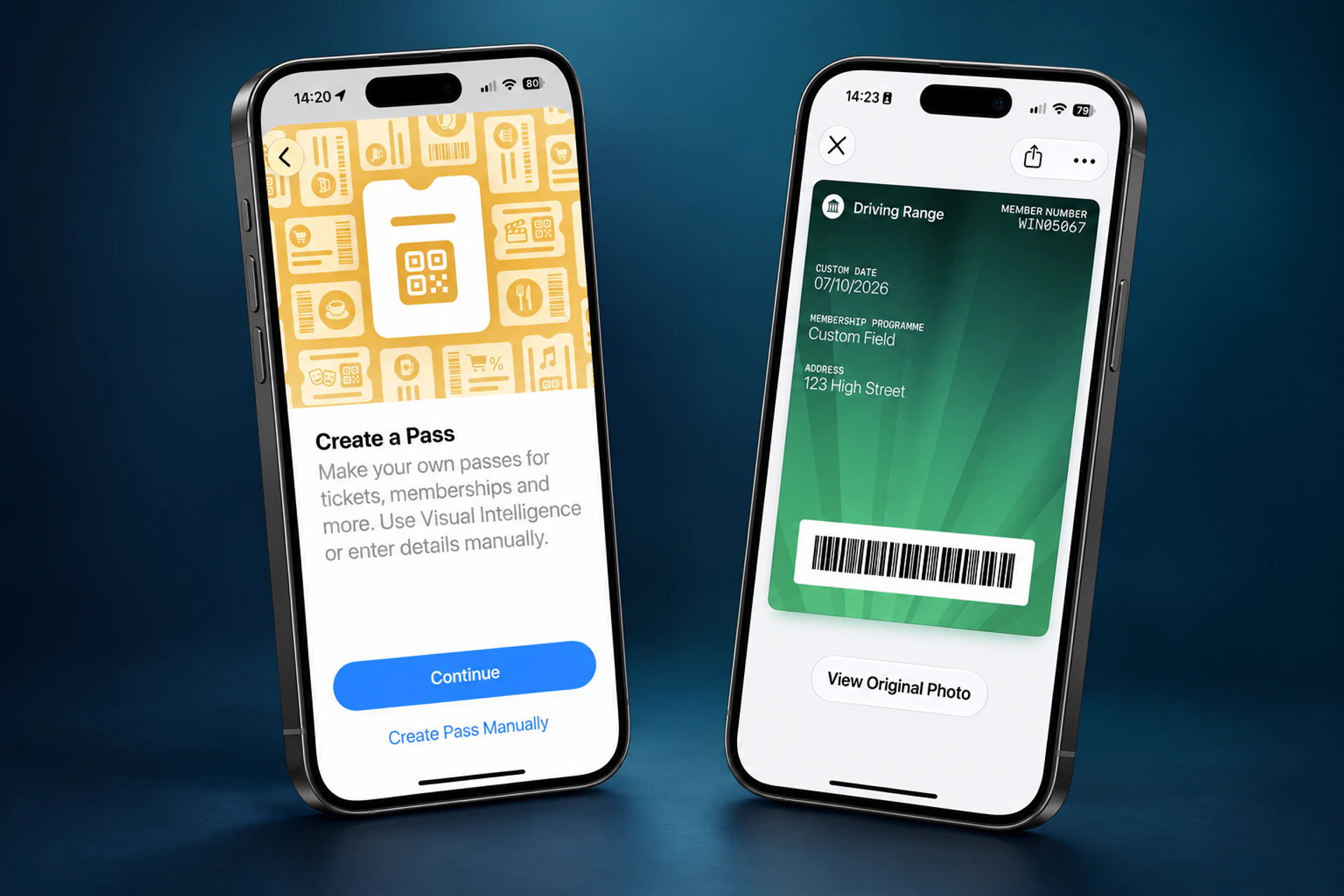
Apple Wallet’s Create a Pass feature is a useful option for people whose membership or loyalty card has a barcode or QR code but no digital pass. In iOS 27, people can make their own Wallet pass from a physical card, photo or screenshot, or create one manually in Wallet.
That can make a library card, a basic loyalty card or a gym membership card easier to carry and find. It does not, however, turn a captured code into an issuer-managed digital credential.
That distinction matters to businesses. A pass a customer creates is a convenient representation of information they already hold. An official Wallet pass is a signed pass that an organisation, or a provider acting for it, issues and can update.
Both have a place. The right choice depends on whether the information needs to stay current, whether the credential must be controlled or authenticated, and how closely it is connected to the customer relationship.
Last updated: 7 October 2026. This article reflects Apple’s public iOS 27 support guidance and Wallet developer documentation at the time of writing.
What Is Apple Wallet’s Create a Pass Feature?
People can create their own Wallet passes from a physical card, photo or screenshot. The feature is suited to membership and loyalty cards with a barcode or QR code but no digital pass, including library cards and gym memberships.
Someone can create a pass in two main ways:
- From a photo or screenshot containing a barcode or QR code, using Apple Intelligence.
- Manually in Wallet by choosing Create a Pass, selecting a template and entering or editing the details.
The photo and screenshot workflow requires an Apple Intelligence-enabled iPhone and is not available in every language or region. Manual creation is a separate Wallet workflow. People can edit their pass’s title, fields, background and colour.
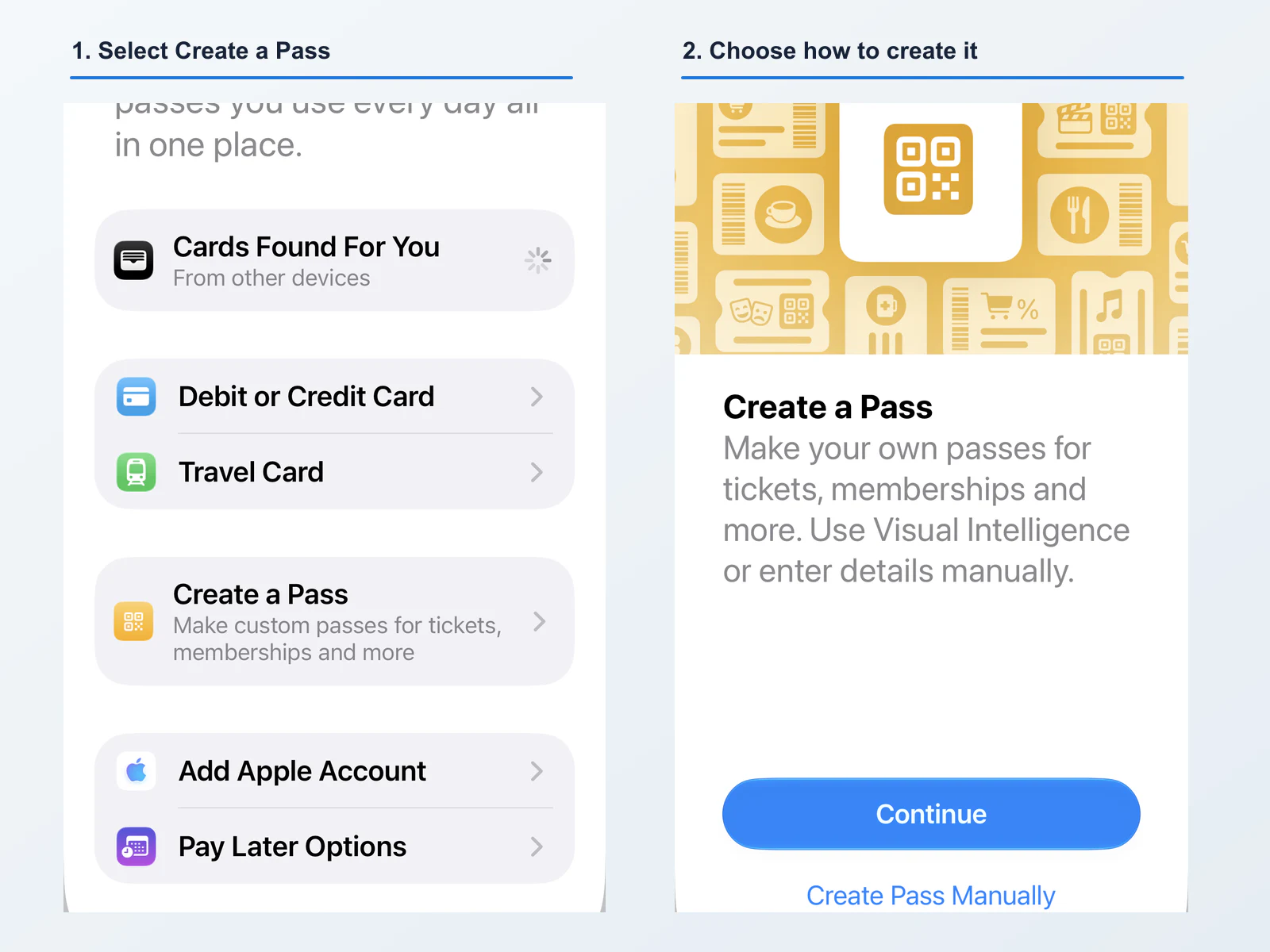
Select Create a Pass in Wallet, then use Visual Intelligence or create the pass manually.
The choices and labels shown can vary by iPhone model, software version, language and region.
For the customer, this is a welcome convenience. A card that previously lived in a drawer, an email or a screenshot can be easier to reach at the point of use.
The feature captures information that is already available to the person. Whether a captured barcode remains acceptable when it is scanned is a decision for the organisation and its validation process; it is not an update relationship with the organisation.
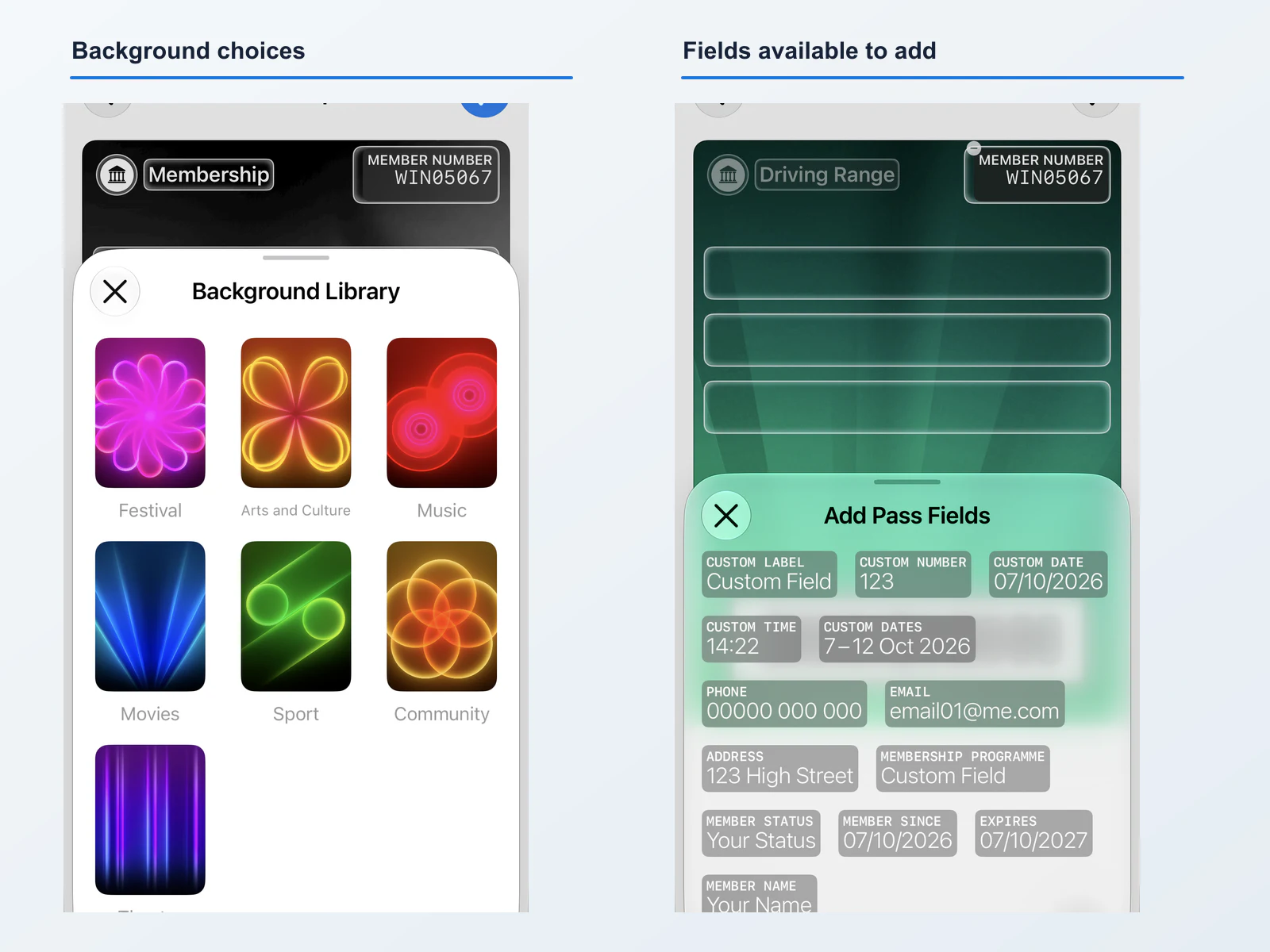
Background choices and available fields for a customer-created pass.
A User-Created Pass Is Not the Same as an Official Pass
The difference is not about whether a card looks good in Wallet. It is about the relationship behind it.
An official Apple Wallet pass is a signed bundle created by or for an organisation. It has a pass type identifier and serial number, can be distributed through an app, website or email, and can be replaced with an updated version using the same pass type identifier and serial number.
A customer-created pass starts with information the customer already has. It can preserve a useful static barcode or record, but it does not automatically create a live connection to the business that originally issued the card or code.
| Customer-created pass | Official business-issued pass | |
|---|---|---|
| Created by | The customer | The organisation or its authorised provider |
| Starting point | A physical card, photo, screenshot or manual entry | An issuer’s customer, programme or booking record |
| Data | A customer-entered or captured copy | Information supplied and managed by the issuer |
| Changes after it is saved | The customer can edit their copy | The issuer can update the same pass |
| Barcode or pass data | A copy of information the customer already has | Can be updated when the issuer’s programme requires it |
| Credential lifecycle | No direct issuer update relationship | Can be managed alongside the underlying customer relationship |
| Best fit | Simple, static credentials where no official pass exists | Loyalty, membership, offers, gift cards, tickets and access credentials that need to remain current |
This does not make a customer-created pass bad or unsuitable. It means it should not be mistaken for a pass the business actively operates.
When Create a Pass Is a Good Customer Solution
Create a Pass works well when the original credential is simple and stable, and the organisation does not already offer a Wallet pass.
Examples might include:
- A library card with a fixed barcode.
- A small local membership programme that only provides a printed card.
- A loyalty card whose barcode does not change and whose balance is not shown on the card.
- A reference card that the person wants to keep handy.
In these situations, Create a Pass can be convenient for a static card when no official Wallet pass is available. That does not mean an official pass requires a customer-facing app: a business can issue one through a website, email, SMS, QR code or account journey.
It can also reveal demand. When customers independently add a card to Wallet, they are signalling that quick access matters to them.
Where a Copied Code Becomes an Operational Problem
The limitations become more significant when the code or information is supposed to change, prove current entitlement or stay aligned with the organisation’s records.
Imagine a membership programme with 50,000 customers. If customers create their own copies of an existing card, the business may have 50,000 Wallet items it did not issue and cannot directly manage.
If the programme changes its barcode format, membership status, balance, expiry date or branding, customer-created copies do not receive updates from the business’s systems. If a membership is cancelled, lost or replaced, the underlying account can change without changing the customer’s copy.
The same issue arises whenever the code or the information behind it changes. A copied code may look unchanged in Wallet, but that does not establish that it is current or acceptable at the point of entry.
Whether a business accepts a static copy is its own operational decision. Reading a barcode is not, by itself, the same as checking a customer’s current status, redemption limit or entitlement. Businesses that need that check should design the pass-redemption process around their own rules.
What an Official Wallet Pass Can Add
An official pass does not need to be complicated, but it can become more useful as the customer relationship changes.
An issuer can distribute an updated version of a pass using the same pass type identifier and serial number. With an update service, customer-specific information can remain current after the pass is already in Wallet. That is the difference between a static copy and an issuer-managed pass with ongoing pass updates.
Depending on the pass type and programme design, an official pass can support:
- Current points, balances, membership status or expiry information.
- Updated barcode or QR-code data, where the issuer provides it.
- A new offer, reward, event time or venue detail.
- The removal or replacement of information that is no longer valid.
- Relevant dates or locations, where the pass is configured to use them.
- Barcode or QR-code data, and other pass features supported by the chosen pass type and implementation.
Wallet can present a pass, but an organisation that grants a benefit, entry or access still needs a process for deciding whether the underlying entitlement is current.
That separation is valuable. It lets Wallet make the credential easy to find without turning a screenshot into a substitute for the organisation’s customer and validation systems.
Official Passes Do Not Require a Customer-Facing App
The useful response is not to stop customers using Create a Pass. It is to make the official option easy to access when the programme needs it.
An official membership card or loyalty pass does not require a customer-facing app. It needs an issuer-managed pass service and, where programme information changes, an appropriate connection to the business’s customer or programme data. The pass can then be issued from a website, email, SMS, QR code or account journey.
An app can still add value for account management, ordering, booking or rich content. It is not a prerequisite for putting a current credential in Wallet.
How Businesses Should Respond to Create a Pass
There is no need to treat Apple’s feature as a threat. It is a useful fallback for customers where an official pass does not exist.
Businesses should instead ask a few practical questions:
- Is our current credential genuinely static? If it is a fixed barcode with no account or operational dependency, a customer-created pass may be perfectly adequate.
- Does the pass need to stay current? If it shows a balance, status, dynamic code, expiry date or booking information, an official pass is likely to be more appropriate.
- Do we need to validate the credential? If the pass grants a benefit, entry, discount or access, the business should define how staff and systems distinguish a current entitlement from a copied code.
- Are customers already asking for Wallet support? Repeated use of Create a Pass can be useful evidence that people want a lower-friction way to carry the credential.
- Can the pass replace an unnecessary app step? An official pass can be issued through a website, email, SMS, QR code or account journey. A well-designed pass-distribution journey makes the official pass easy to save without requiring an app download.
The answer will vary by programme. A local static card and a high-volume membership platform have different needs. The important thing is to design the credential around what the customer and the organisation need it to do after it has been saved.
Frequently Asked Questions About Apple Wallet Create a Pass
Can a customer create an Apple Wallet pass from a barcode or QR code?
Yes. People can create their own passes from a physical card, photo or screenshot containing a barcode or QR code. They can also create a pass manually in Wallet using a template and editable fields.
Will a pass created from a screenshot always work?
Not necessarily. It may work for a simple, fixed barcode if the business accepts that barcode. A screenshot does not establish an ongoing connection to the organisation that issued the original credential, and it will not reflect later changes to the underlying programme.
Can businesses update a pass that a customer created themselves?
Not as an issuer-managed Wallet pass. The customer can edit their own pass, but the business does not automatically gain a way to change the copied pass on the customer’s device. An official pass can be kept current through the pass management service that issued it, such as PassKit.
Does an official Wallet pass require a customer-facing app?
No. A business can issue an official pass through a website, email, SMS, QR code or account journey. For passes that need to stay current, the business needs an issuer-managed pass service connected to the relevant customer or programme data.
Can an official Apple Wallet pass show a changing balance or membership status?
Yes. An organisation can update information on a pass that it issued after the customer has saved it. This is useful for balances, rewards, membership status, booking information and other data that can change over time.
Does Create a Pass replace official Apple Wallet passes?
No. Create a Pass gives customers a convenient way to represent credentials where no official digital pass exists. It does not replace the issuing, signing, updating and lifecycle management available when an organisation provides an official pass.
Should businesses stop customers from creating their own passes?
Not necessarily. For static credentials, it may be a helpful customer convenience. Businesses should be clear about what they accept and should provide an official pass when a credential needs to be current, verified or managed over time.
Looking Ahead
Apple Wallet’s Create a Pass feature is good news for customers who want a simple card at their fingertips. It will also make more people expect the organisations they use to be available in Wallet.
For a static card, a customer-created pass may be all that is needed. For an ongoing loyalty, membership, ticketing, gift-card or access relationship, an official pass gives the business and customer a better way to keep the credential useful over time.
If customers are already creating their own versions of your card, that is a useful signal: they want the convenience of Wallet. The next step is to decide whether a static copy is sufficient or whether the programme needs an official pass that can stay aligned with the customer relationship.
Want to give customers a branded Wallet pass instead? PassKit can help you issue and manage official passes through the channels you already use, so customers have an official option to save rather than having to create their own copy. Explore PassKit pass distribution.