
Wallet Notifications for Retail: How They Work
Learn how retail wallet notifications work through pass updates, messages, and location relevance across Apple Wallet and Google Wallet.
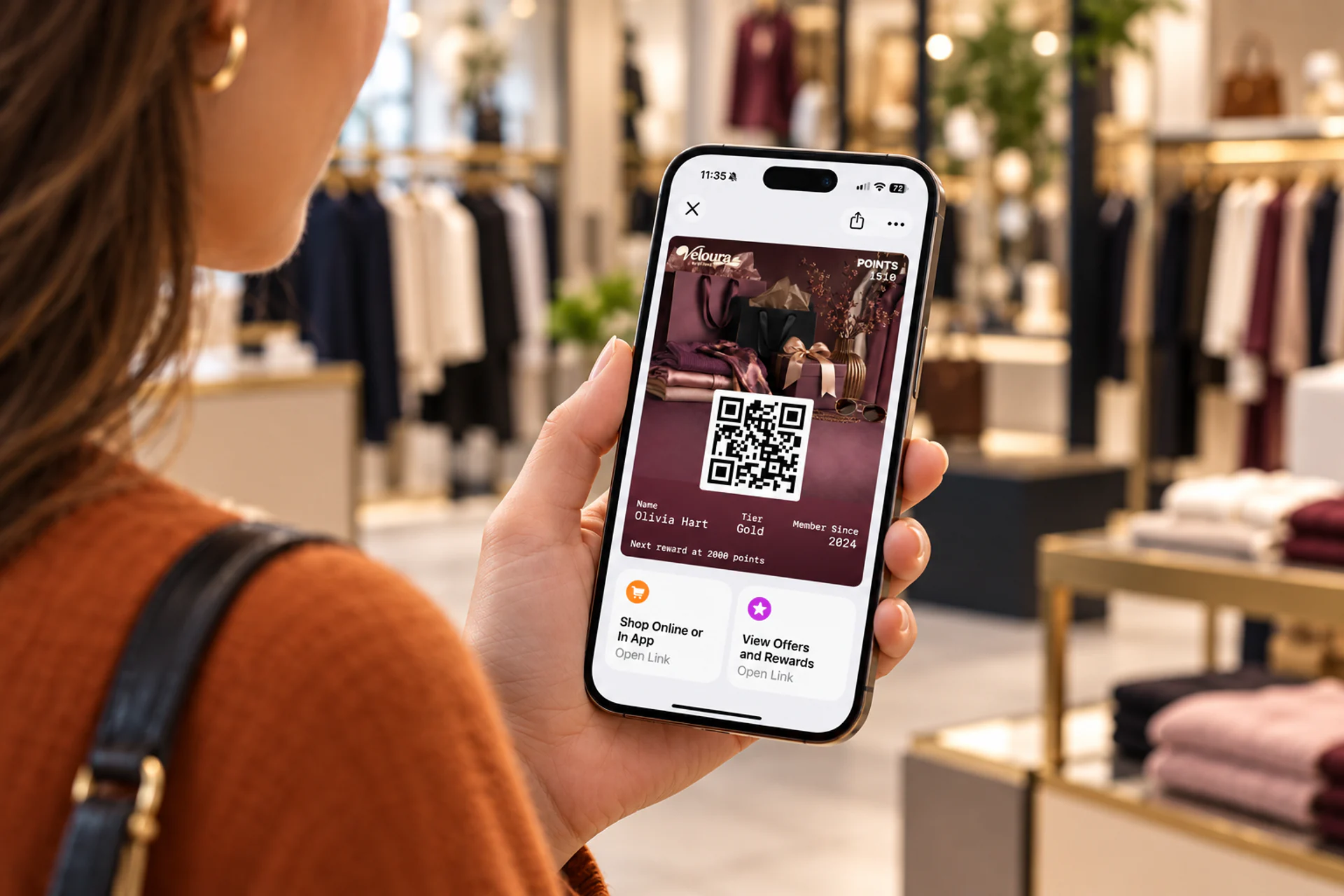
Wallet notifications for retail can make a saved loyalty card, coupon, or gift card more useful after a customer adds it to Apple Wallet or Google Wallet. A points balance can change, an available reward can appear, or the wallet can make a relevant pass easier to reach near a store.
Those experiences are often described as if they were one type of notification. They are not.
Retail wallet communication generally involves three different mechanisms:
- Updating information displayed on a pass.
- Sending a targeted or scheduled message to pass holders.
- Adding location relevance so the wallet can surface the pass in context.
Each mechanism has a different purpose, customer experience, and level of control. Understanding the distinction helps retailers choose the right option without treating a wallet pass like an unrestricted mobile-app push channel.
What Are Wallet Notifications for Retail?
A retail wallet notification is information associated with a pass that a customer has saved in Apple Wallet or Google Wallet. Depending on the mechanism and wallet platform, the customer may see a lock-screen alert, a notice attached to the pass, an updated field, or a suggestion that makes the pass easier to access.
These experiences may also be described as e-wallet notifications, mobile wallet push notifications, retail push notifications, or wallet pass notifications. These terms are useful shorthand, but they can hide an important distinction: the experience might come from a pass update, an issuer message, or the wallet deciding that a pass is contextually relevant. On Android, these experiences normally involve Google Wallet passes; on iPhone, they involve Apple Wallet passes.
The saved pass is the essential starting point. A retailer cannot use a wallet pass to contact every shopper with a phone. The customer must first receive and save the relevant loyalty card, coupon, gift card, membership card, or other pass.
For digital wallet marketing for retailers, that opt-in relationship matters. Communication begins with a pass the customer deliberately saved, and each subsequent update or message should remain relevant to its purpose.
Why Retail Wallet Notifications Matter
Wallet passes are becoming a more familiar place for customers to keep non-payment items. ACI Worldwide’s 2025 Mobile Wallet Trend Report found that use of mobile wallets for items such as tickets, boarding passes, and loyalty cards increased by 92% between 2019 and 2023, rising from 21% to 39% of respondents.

That familiarity creates an opportunity for retailers, but the business value still depends on relevance. Deloitte’s 2025 Consumer Loyalty Program Survey, based on 5,564 US loyalty-programme members, found that 72% said loyalty programmes made them more likely to spend with their preferred brand and 56% said they increased their spending because of the programme. Yet 40% also admitted that they sometimes forgot to redeem rewards.
Retail wallet notifications can help close that visibility gap by keeping a saved reward, balance, or wallet coupon current and easier to retrieve. They do not create value by themselves: the pass still needs a worthwhile benefit, accurate data, and a clear reason for the customer to act.
It is also important to separate two events:
- The pass was updated: New information reached the saved pass.
- The customer saw a notification: The wallet and device decided to display an alert, subject to platform rules and the customer’s settings.
An update can succeed without producing a visible notification. Retailers should therefore design wallet activity around keeping the pass accurate and useful, rather than assuming every change will command attention.
Three Ways Retail Wallet Notifications Work
Retail wallet notifications work through pass updates, targeted or scheduled messages, and location relevance. Each mechanism supports a different customer interaction and is subject to different Apple Wallet or Google Wallet rules.
1. Pass updates
Wallet pass updates change information after a pass has been issued. For a retailer, that might mean updating:
- A loyalty-points balance.
- The customer’s current tier.
- An available reward.
- A gift-card or stored-value balance.
- A coupon expiry date.
- A membership status.
The primary job of an update is accuracy. When a customer opens the pass, it should reflect the current information held by the system responsible for that programme.
Some customer-visible field changes may generate an alert, but retailers should not assume that every background change will do so. Whether an alert appears depends on the field, the wallet platform, the configured change message, and the customer’s device settings.
Pass updates are the strongest foundation for retail wallet notifications because they connect communication to a real change in customer value. A message such as “You now have 540 points” is more useful when the pass visibly shows the same balance.
Digital loyalty card notifications, including loyalty points wallet notifications, should therefore reflect the current programme record rather than operate as disconnected promotional messages.
For a deeper loyalty-specific workflow, see how mobile wallet loyalty systems use automated reward notifications.
2. Targeted or scheduled messages
PassKit Messaging lets a retailer communicate with all eligible pass holders, an individual holder, or a selected segment. However, the underlying wallet behaviour is different on Apple Wallet and Google Wallet.
- Apple Wallet: Apple uses change messages associated with pass-field updates. Apple’s Wallet design guidance says these interruptions should be reserved for time-critical information and must not be used for marketing or other noncritical communication.
- Google Wallet: Google supports issuer-authored messages using
TEXT_AND_NOTIFY. These add a message to the saved pass and can trigger a notification, subject to user settings, platform rules, and frequency limits.
PassKit’s Wallet Pass Messaging brings supported Apple Wallet and Google Wallet communication into one operational interface and provides scheduling and audience filters. The PassKit Messages documentation explains the available workflow.
Messages should remain closely related to the pass the customer chose to save. A loyalty member may reasonably expect information about an earned reward. Someone who saved a specific offer may value a reminder before it expires. Unrelated promotional blasts are more likely to feel intrusive and lead customers to disable notifications or remove the pass.
Scheduled delivery also requires realistic expectations. PassKit’s message scheduling guidance explains that a supported notification appears once when the message is first received, while the message can remain displayed on the pass until its configured end time. Scheduling a message does not override Apple or Google platform rules.
3. Location relevance
Location relevance helps the wallet recognise when a saved pass may be useful near an associated place. For example, a loyalty card could become easier to access when its holder approaches a participating store.
This is not the same as a retailer tracking a customer entering a geofence and sending a conventional push notification.
Location-based wallet notifications are sometimes described as geofenced wallet notifications in retail, but the platforms implement them differently:
- Apple Wallet uses relevance information stored with the pass. The device determines whether and when to suggest the pass on the Lock Screen.
- Google Wallet uses Nearby Passes notifications. The customer must allow notifications and precise, always-on location access; Google determines the proximity and dwell conditions and controls the notification text. Google currently allows up to 10 merchant locations on a pass class and 10 on an individual pass object.
In both cases, the retailer does not receive a live record confirming that the customer entered the area. PassKit also cannot confirm that the customer saw or opened the location-based suggestion.
The destination is also limited. When the customer taps a location-relevant message, the wallet opens the associated pass. It does not use that message to open an arbitrary product page, map, or separate application. The location-based message documentation explains these privacy and destination boundaries.
Location relevance works best when the pass has an obvious purpose at that place: earning points, presenting a membership card, redeeming an offer, or checking stored value.
Which Mechanism Fits Each Retail Interaction?
The correct mechanism depends on what changed and what the customer needs to do next.
| Retail interaction | Best starting mechanism | Practical guidance |
|---|---|---|
| Loyalty balance changed | Pass update | Update the displayed balance and use an alert only when the change is meaningful. |
| Customer entered a new tier | Pass update | Show the new status and make the new benefit clear on the pass. |
| Reward became available | Pass update or relevant message | Connect the message to a reward the customer actually earned. |
| Saved coupon is approaching expiry | Accurate expiry data and a platform-appropriate reminder | Google Wallet can support pass messages and an automatic notification two days before an offer expires. On Apple Wallet, do not use a marketing change message merely to create urgency. |
| Gift-card balance changed | Pass update | Keep the stored value current after the connected system records the transaction. |
| Customer is near a participating store | Location relevance | Make the saved pass easier to retrieve at the moment it may be useful. |
| Selected members qualify for an offer | Targeted message | Segment using programme data and explain why the recipient qualifies. |
| Customer needs detailed service or order information | Email, SMS, app, or web | Use a channel that can support the required detail and interaction. |
The strongest retail wallet notification normally answers at least one of these questions:
- What changed?
- What customer value is now available?
- Why is this pass useful at this moment?
- What simple action should the customer take next?
If the message cannot answer one of them, it may not belong in the wallet.
Retailers planning these interactions can explore PassKit’s retail wallet capabilities to see how wallet passes, updates, messaging, and location relevance work together.
Three Retail Wallet Notification Scenarios
The same retail objective can involve more than one mechanism. These examples show where each mechanism starts and where another channel may be more appropriate.

A reward becomes available after a purchase
The loyalty or transaction system first confirms the qualifying purchase and calculates the new balance. It then updates the wallet pass so that the earned reward and current balance agree with the source system.
If the changed field supports a customer-facing alert, the wallet may surface that update. A separate targeted message is most useful when the retailer has a legitimate follow-up reason, such as reminding eligible members about an unused reward. It should not compensate for an inaccurate or delayed pass update.
A saved coupon is approaching expiry
The pass should already show the correct offer and expiry information. On Google Wallet, a relevant pass message or the platform’s automatic notification two days before a saved offer expires can remind a customer who deliberately saved the coupon. On Apple Wallet, keep the expiry information and relevance configuration accurate rather than using a marketing change message merely to create urgency.
Wallet coupon notifications work best when they reinforce an offer the customer chose to keep, rather than introduce an unrelated promotion through an existing pass.
Detailed conditions, product exclusions, or a long promotional explanation belong on the associated webpage or in email. The wallet notification should communicate the immediate value and make the saved pass easy to retrieve.
A customer approaches a participating store
Location relevance can make the appropriate loyalty card or offer easier to reach near the store. Apple Wallet or Google Wallet determines whether to surface it, and opening the suggestion takes the customer to the pass.
This interaction is useful when the customer can present, scan, or redeem the pass at that location. It should not be interpreted as proof that the person entered the store or viewed the suggestion.
Why a Customer May Not See a Wallet Notification
Wallet notifications are not guaranteed impressions. Several factors can prevent a visible alert even when the underlying pass remains valid and current.
Notifications or location access are disabled
Customers control notification and location permissions. They may disable alerts for the wallet application, location access, or an individual pass. A retailer cannot override those choices.
The pass changed without a customer-facing alert
A system may update data silently so that the pass is accurate the next time it is opened. This is useful for routine synchronisation but should not be reported as a delivered notification.
The change was not eligible or configured for an alert
Apple Wallet and Google Wallet only surface alerts for supported and correctly configured changes. Apple change messages must be attached to an updated field, while Google field-update notifications require a supported field and the appropriate notification preference. Platform rules and customer settings still determine what appears.
Platform limits or throttling applied
Google’s message functionality allows a maximum of three notification-triggering messages per pass within 24 hours and may apply additional throttling. The current Google Wallet notification documentation also notes that the user must have notifications enabled.
Frequency limits are not targets. A retailer should send far fewer messages whenever the customer experience does not justify them.
The location conditions were not met
Location relevance depends on the wallet platform’s assessment of proximity, permissions, connectivity, wallet behaviour, and the pass configuration. It should never be treated as proof that a customer visited a store.
The pass is no longer installed
A customer may remove a pass or move to another device without restoring it. Retailers should use lifecycle reporting to understand installations and removals, while recognising that wallet platforms do not provide universal notification-open tracking.
Apple Wallet vs Google Wallet Notifications for Retail
Both wallets support passes that can remain current after installation, but Apple Wallet notifications for retailers and Google Wallet notifications for retailers have different triggering rules, message formats, platform limits, and permission requirements.
| Consideration | Apple Wallet | Google Wallet |
|---|---|---|
| Pass changes | Can display change messages associated with meaningful field updates | Supports change messages for qualifying user-facing field updates |
| Issuer messages | No equivalent to Google’s standalone message object; change messages must accompany relevant field updates and must not be used for marketing | TEXT_AND_NOTIFY messages can be added to a pass and trigger a notification, subject to limits and user settings |
| Location relevance | The device may suggest a pass near a configured relevant location | Nearby Passes can notify users who have enabled notifications and precise, always-on location access |
| Message destination | Generally opens the relevant pass | Can direct the holder into the pass message experience; related links may be supported in messages |
| User control | Customer settings affect whether alerts and location suggestions appear | Customer settings affect whether notifications and nearby suggestions appear |
For both platforms, relevance is more important than volume. PassKit’s guidance to Apple Wallet and Google Wallet push notifications recommends keeping communication directly related to the pass and warns that platforms may throttle or block excessive activity.
Retailers that need a broader feature comparison can read Apple Wallet vs Google Wallet. A retail notification strategy only needs to understand the differences that affect the intended customer interaction.
Wallet Notifications vs SMS, Email, and App Push
Wallet notifications are most effective as part of a channel strategy, not as a replacement for every other channel.
| Channel | Strongest role | Main limitation |
|---|---|---|
| Wallet pass | Concise information related to a saved card, reward, offer, balance, or credential | Requires an installed pass and remains subject to wallet behaviour |
| SMS | Short, direct, time-sensitive communication | Cost, consent, and message fatigue must be managed |
| Detailed explanations, receipts, editorial content, and account information | Messages can be delayed or overlooked in the inbox | |
| Mobile-app push | Rich engagement inside an installed branded application | Requires the customer to download and retain the app |
| Web or account portal | Detailed transactions, preferences, support, and account management | The customer must intentionally visit the destination |
A wallet pass can tell a loyalty member that a reward became available. Email can explain the full promotion. SMS can handle a genuinely urgent service message. An application can support a more complex interaction. The channels work better when each performs the job it is suited to.
How to Measure Retail Wallet Notification Performance
Wallet reporting should distinguish technical delivery, audience availability, and business outcomes. Treating them as the same metric can overstate performance.
| Signal | What it can indicate | What it does not prove |
|---|---|---|
| Pass installed | The pass is available on a customer’s device | The customer saw a particular update or message |
| Pass update processed | The current pass data was accepted or published by the responsible system | Every installed pass refreshed immediately or displayed an alert |
| Message job completed | PassKit finished processing the eligible audience | Every wallet platform delivered an alert or every recipient noticed it |
| Tracked related link used | The customer used a measurable tagged link associated with the pass | The notification alone caused the action |
| Reward or offer redeemed | The intended commercial outcome occurred | The result should receive full notification attribution |
| Pass removed | The pass is no longer available on that device | One specific message caused the removal |
The most useful measurement design connects wallet activity with the transaction, loyalty, coupon, or redemption system that records the intended outcome. Compare eligible audiences, control groups where practical, redemption timing, repeat visits, and removal patterns without presenting notification delivery as confirmed attention.
Retail Wallet Notification Checklist
Before updating a pass or planning a message, ask:
- Has the customer saved the relevant pass?
- Has meaningful customer information changed?
- Is the communication directly related to that pass?
- Does the interaction need a pass update, a message, or location relevance?
- Will the updated pass confirm the same information as the alert?
- Would email, SMS, an app, or a webpage communicate the information more effectively?
- Have Apple Wallet and Google Wallet differences been considered?
- Can the team support the current product and platform requirements?
- Is the frequency proportionate to the value delivered?
- Can success be measured without assuming a notification was viewed?
This checklist keeps the customer experience tied to usefulness rather than message volume.
Frequently Asked Questions
These answers cover common questions about retail wallet notifications, including platform differences, coupon reminders, location relevance, delivery limitations, and performance tracking.
Can retailers send push notifications through Apple Wallet?
Retailers can update an Apple Wallet pass and attach a change message to an eligible field. Apple says change messages should be reserved for time-critical information and must not be used for marketing or other noncritical communication. Apple Wallet is therefore not an unrestricted retail push-notification channel.
How do wallet passes work on Android?
Wallet passes for Android are normally saved in Google Wallet. Once a customer saves a loyalty card, offer, gift card, or other supported pass, the issuer can keep its information current. Google Wallet also supports eligible field-update notifications, issuer messages, and Nearby Passes notifications, subject to user permissions and platform limits.
Can digital wallet coupons send expiry reminders?
Yes, but the behaviour depends on the platform. Google Wallet can automatically notify customers two days before a saved offer expires and can support relevant issuer messages. Apple Wallet can display an accurate expiration date and use time or location relevance, but retailers should not use Apple change messages as promotional countdown alerts.
Are location-based wallet notifications the same as retail geofencing?
Not exactly. Apple Wallet uses pass relevance information evaluated by the device, while Google Wallet’s Nearby Passes feature uses permissions and location conditions controlled by Google. In neither case does the retailer receive a live notification proving that a customer entered the store or viewed the suggestion.
Why might a customer not receive a retail wallet notification?
The pass may no longer be installed, notifications or location permissions may be disabled, the updated field may not support an alert, or a platform limit may apply. A pass can also update successfully without producing a customer-visible notification.
Can retailers track wallet-notification opens?
Apple Wallet and Google Wallet do not provide universal notification-open or pass-view reporting. Retailers should instead measure supported lifecycle events, tracked link activity, coupon or reward redemption, repeat visits, and changes in pass removals without treating those signals as proof that a particular notification was viewed.
How PassKit Supports Retail Wallet Engagement
PassKit helps retailers create and operate passes across Apple Wallet and Google Wallet. The relevant capabilities include:
- Pass updates for keeping balances, tiers, rewards, expiry dates, and other information current.
- Wallet Pass Messaging for supported targeted and scheduled messaging workflows.
- Location relevance for making a saved pass easier to access around an appropriate retail location.
- Integrations for connecting wallet passes with the systems that own customer, transaction, loyalty, or offer data.
- Pass analytics for monitoring supported lifecycle, distribution, installation, and redemption activity.
The right design depends on the programme. A retailer may start with a digital loyalty card, a saved coupon or offer, or a digital gift card. The important step is to decide which system owns the underlying data and which wallet mechanism should communicate each change.
Ready to make saved retail passes more useful after installation? Explore PassKit’s retail wallet capabilities or start building a wallet programme.