
Meet the new PassKit: a redesigned workspace for Apple Wallet and Google Wallet
Meet the redesigned PassKit application: a faster, simpler workspace for managing Apple Wallet and Google Wallet programmes.
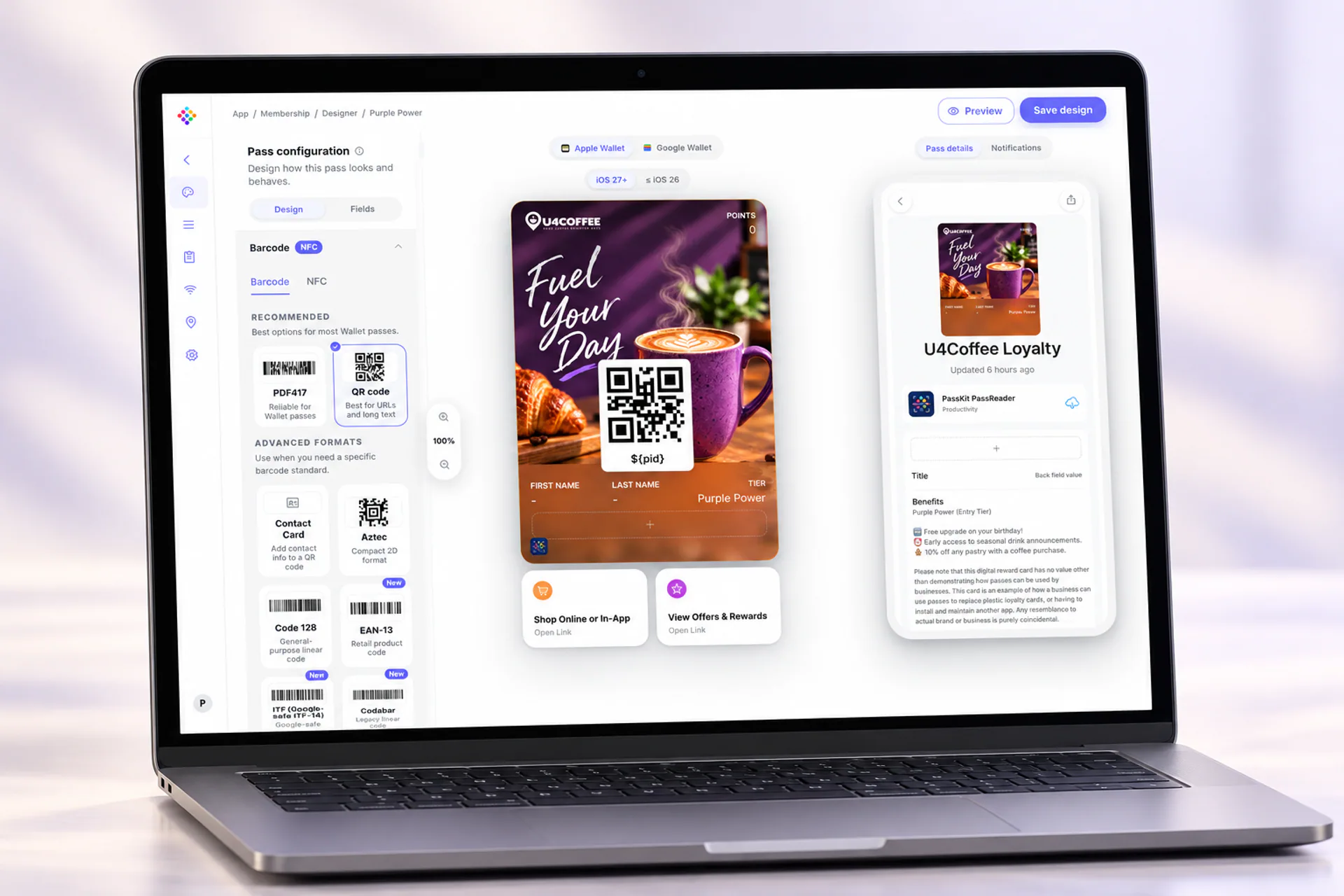
Today marks a new chapter for PassKit. After around six months in preview, shaped by customer feedback and real-world use, our completely redesigned application is now the standard PassKit experience at app.passkit.com.
It is faster and simpler to use, but the change goes much further than a new interface. The application has been rebuilt as the foundation for the next generation of PassKit capabilities: a place where teams can design, distribute, update and measure wallet programmes while Apple Wallet, Google Wallet and their customers’ expectations continue to evolve.
A simpler workspace for increasingly powerful wallet experiences
PassKit has always made it possible to manage Apple Wallet and Google Wallet from one platform. That remains the goal. But wallet programmes have become more sophisticated: they need thoughtful design, live data, relevant communication, clear ownership and reliable day-to-day operations.
The new application brings those jobs into a more coherent workspace. Whether a team is creating a pass, reviewing performance, preparing a campaign or managing an account, the experience is designed to make the next useful step easier to find.
A completely redesigned PassKit interface
The new PassKit application has been redesigned from the ground up around the workflows customers use most. Navigation is simpler, key information is easier to reach and the experience is more consistent across pass design, distribution, messaging, analytics and account administration.
That matters because a wallet pass is not a one-off asset. A programme often changes after launch: a balance updates, an event gets closer, an offer becomes relevant or a team needs to adjust a design. A cleaner, faster workspace helps teams keep pace without making routine work feel like a technical project.
Give the right people the right access
Wallet programmes rarely belong to one person. Marketing may own the campaign, customer experience may define the journey, operations may need to keep information current and technical teams may connect programme data.
Organisations can now manage team members from within PassKit: invite colleagues, assign the access that fits their responsibilities and keep account administration alongside the programme itself. This gives teams a more practical way to work together without sharing one login or turning every change into a support request.
Reach pass holders directly from PassKit
Messaging is now deeply integrated into the application, so a saved pass can remain an active customer communication channel rather than something issued once and forgotten.
Teams can create messages for all pass holders, use pass filters to focus on a relevant audience or narrow communication to an individual recipient. Messages can be scheduled for the right date, time and timezone, giving campaigns a defined display window instead of relying on a manual send at the last minute.
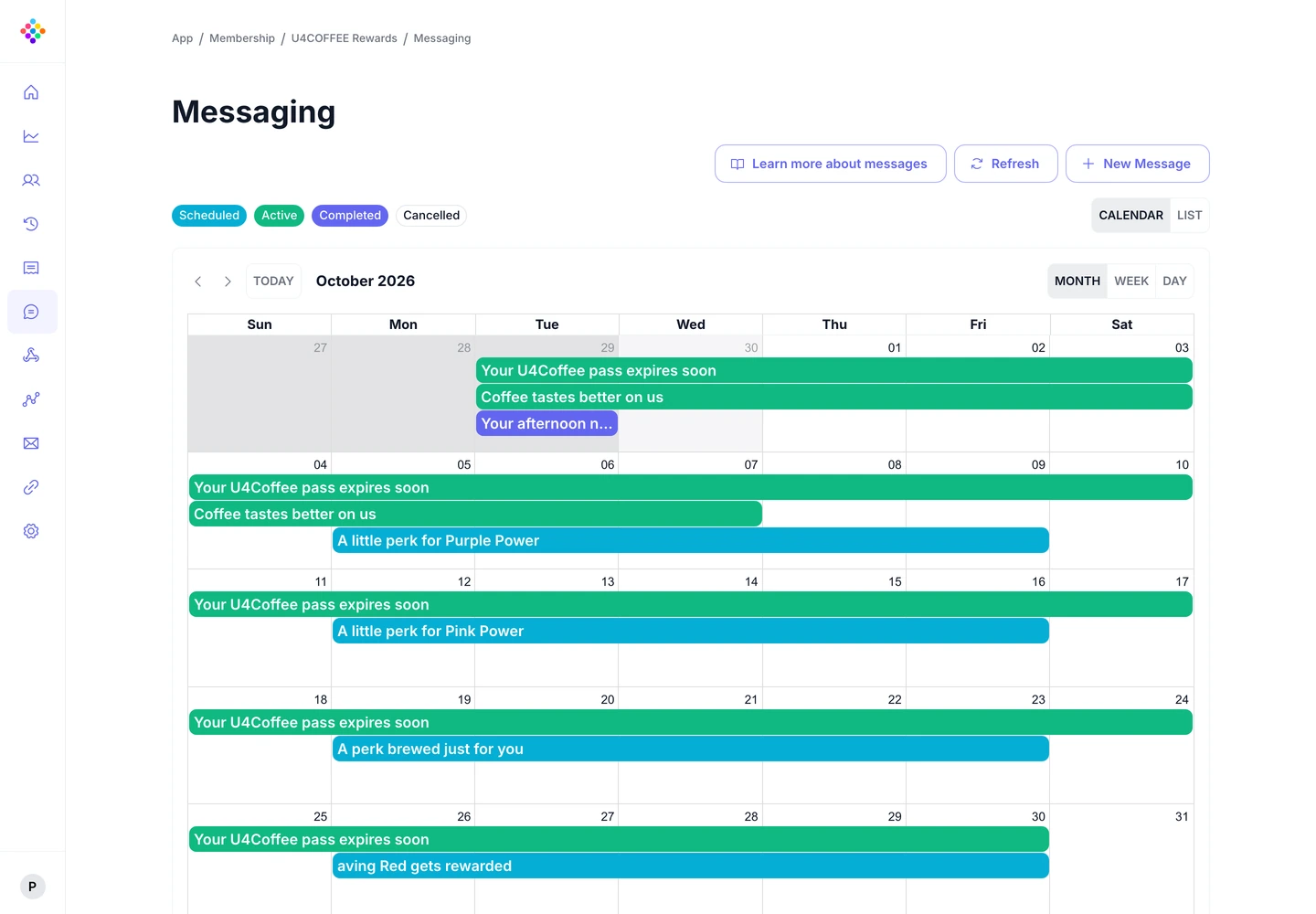
For a membership programme, that could mean a timely reminder about a benefit. For an event, it could be practical information before doors open. For an offer, it could be a message for the people most likely to find it useful. Explore PassKit Messaging to see how targeted and scheduled pass communication works.
Designed for the new Apple Wallet
Apple Wallet is becoming a richer place for customers to interact with a pass. PassKit supports Apple’s Poster Generic presentation for suitable Apple Wallet passes, giving brands a more visual, artwork-forward canvas while retaining the essential information and barcode people need to use the pass.
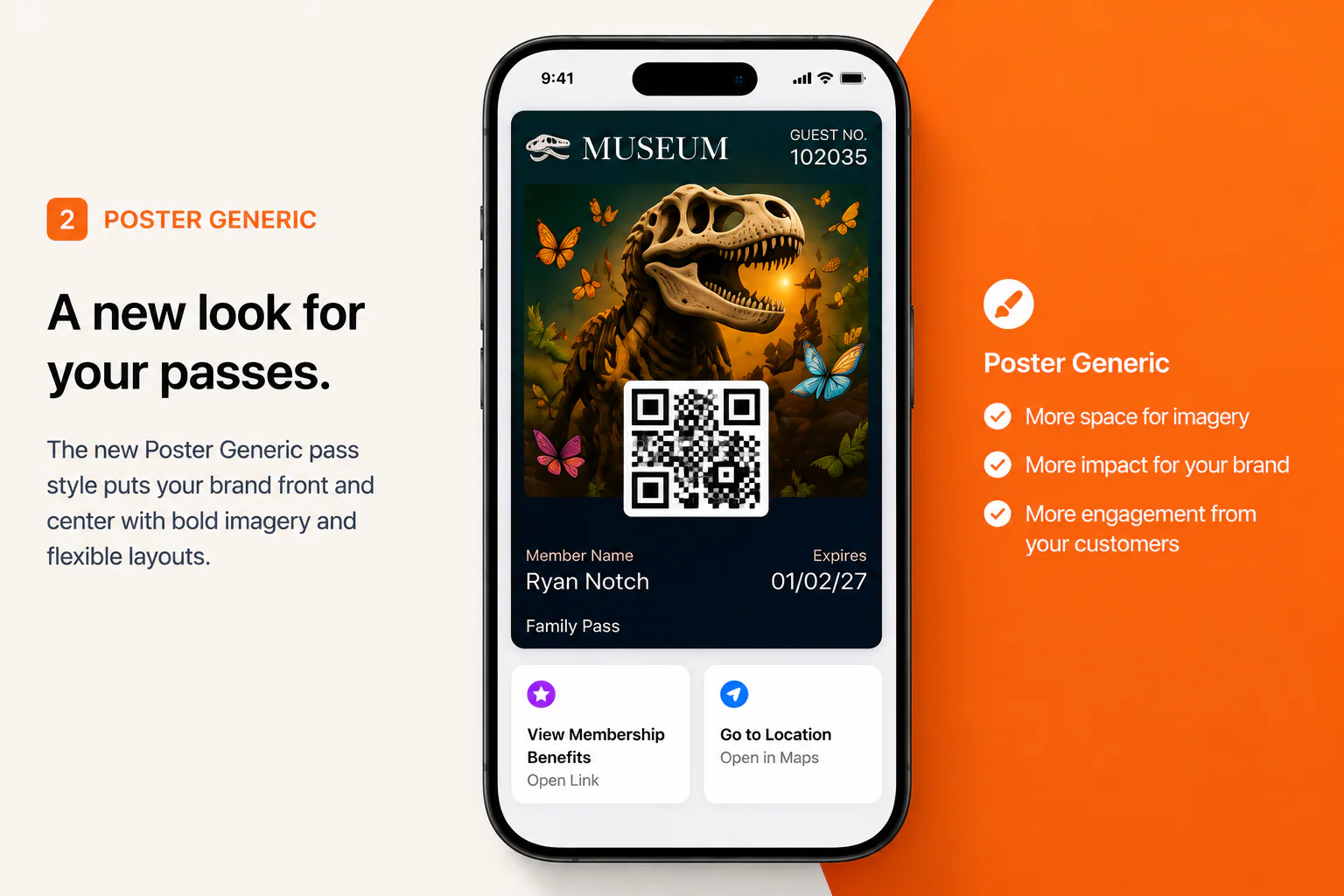
Poster Generic is available on iOS 27 and later, so it should be planned alongside an appropriate legacy pass style for earlier devices. It is not simply a larger image: the artwork, key fields and barcode need to work together in the Wallet experience. PassKit also supports Apple Wallet Featured Actions, helping customers reach a useful next step directly from the pass where appropriate.
For teams moving an existing design into this new style, the Poster Generic pass workflow provides a practical route from design to a managed programme.
Ready for the new Google Wallet experience
Google Wallet’s redesigned pass presentation has now rolled out, bringing a more immersive, vertically scrolling experience for opened passes. That makes the choices behind a pass matter even more: a recognisable logo, strong colour contrast, a useful hierarchy and artwork that works in the space Google provides.
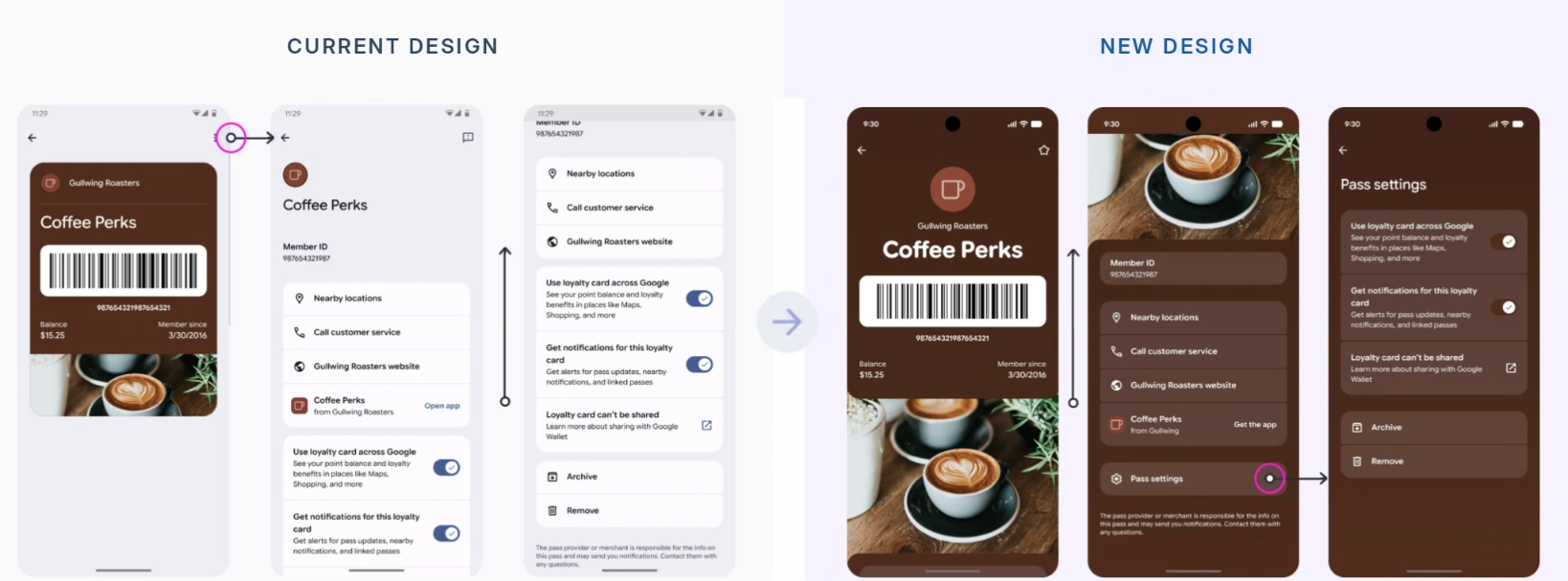
PassKit helps teams optimise a single programme for both wallets while respecting their increasingly different presentation models. For Google Wallet, that includes considering its circular logo treatment, a full-width 5:4 hero image and clear tappable links. Google controls how a pass is ultimately rendered in its app, while PassKit gives teams the tools to create, distribute, update and manage the programme behind it. Explore Pass Designer to see how those design decisions fit into the wider pass workflow.
Bring existing Apple Wallet designs into PassKit
Starting again should not be the price of moving to a managed wallet programme. If a business already has an Apple Wallet design, it can design in Apple Pass Designer, export the resulting .pkpasstemplate file and import that template into PassKit rather than recreating the design by hand.
From there, the team can issue passes, connect programme data and keep the experience current after launch. Read more about importing an Apple Pass Designer template.
Take certificate renewal off your operational checklist
Certificate management is one of the less visible parts of running an Apple Wallet programme, but it is essential. An expired certificate can interrupt pass issuance and updates, and manual renewal can become a risk when ownership changes or a recurring task is missed.
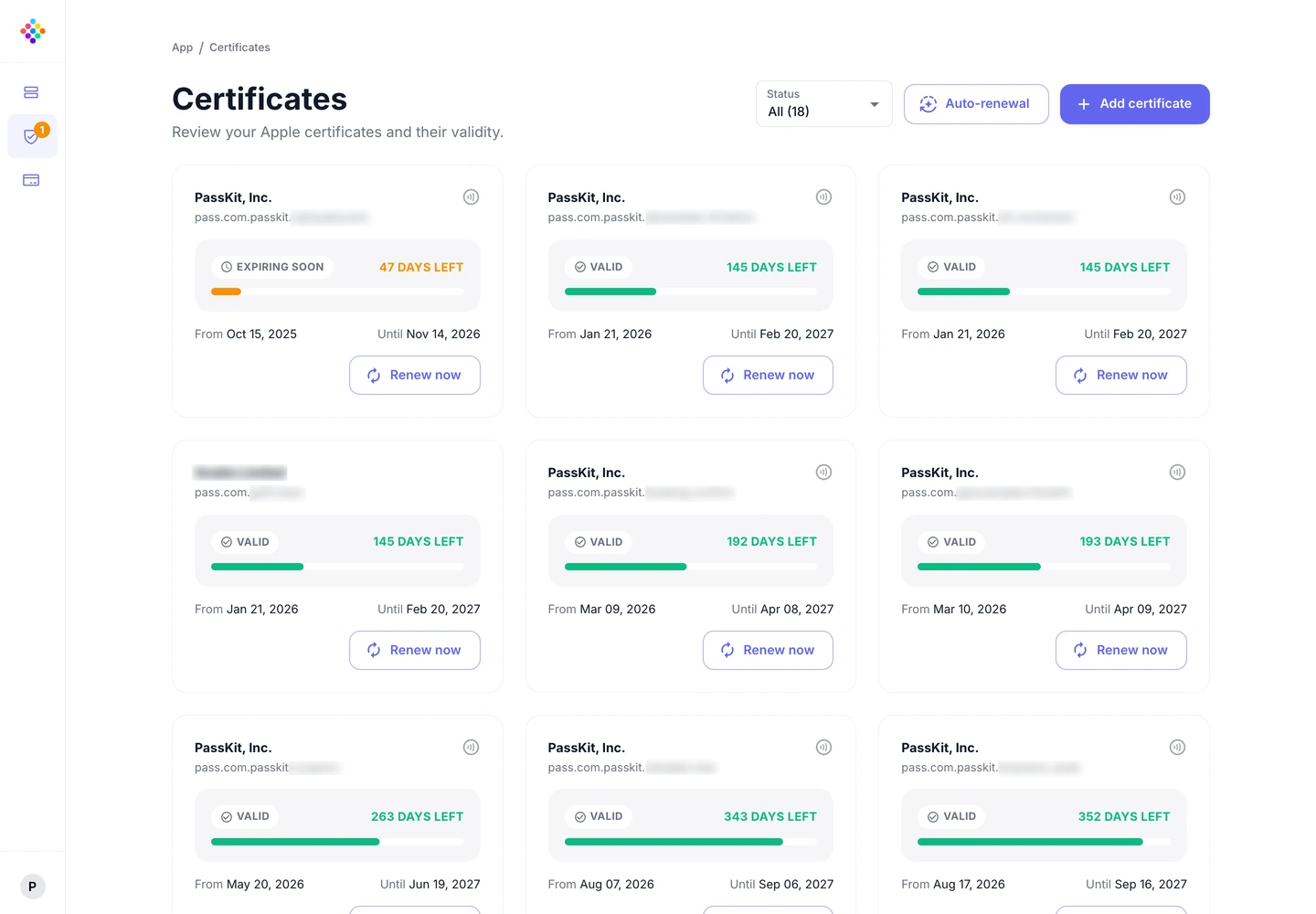
With Wallet Certificate Management, teams set up the required wallet credentials and PassKit keeps Apple Wallet certificates current automatically after setup. It reduces an operational dependency without taking control away from the people responsible for the programme.
Built for what’s next
The launch of the new PassKit application is a major milestone, but it is not the finish line. It gives us a stronger foundation for the capabilities, workflows and wallet experiences that come next.
Apple Wallet and Google Wallet are opening new possibilities for how businesses connect with their customers. We will keep improving the application, introducing useful capabilities and making it easier to get more value from every pass as those platforms evolve.
Customer feedback has already been instrumental in shaping this release. We want that conversation to continue. Whether there is a small workflow you would like to simplify, a feature you have been waiting for or a completely new use case for digital wallets, we would like to hear about it.
One platform for the next generation of wallet experiences
The new application brings design, distribution, messaging, account access and operational tooling closer together so teams can run more capable wallet programmes without adding unnecessary complexity.
Existing customers can log in to the new PassKit application. If you are exploring what Apple Wallet and Google Wallet could do for your business, create a PassKit account to get started.
To share feedback, ideas or questions, use the chat in the PassKit application or email support@passkit.com.